Hello team,
I attempted to train this morning but every time I launched the app, after a quick loading on the calendar it went to a black screen and I couldn’t access any of the training. I rebooted my phone and it still did the same thing. I had to uninstall and reinstall the app for it to work. I will be doing my ride later today but wanted to let you know.
Pixel 4xl Android version 11
1 Like
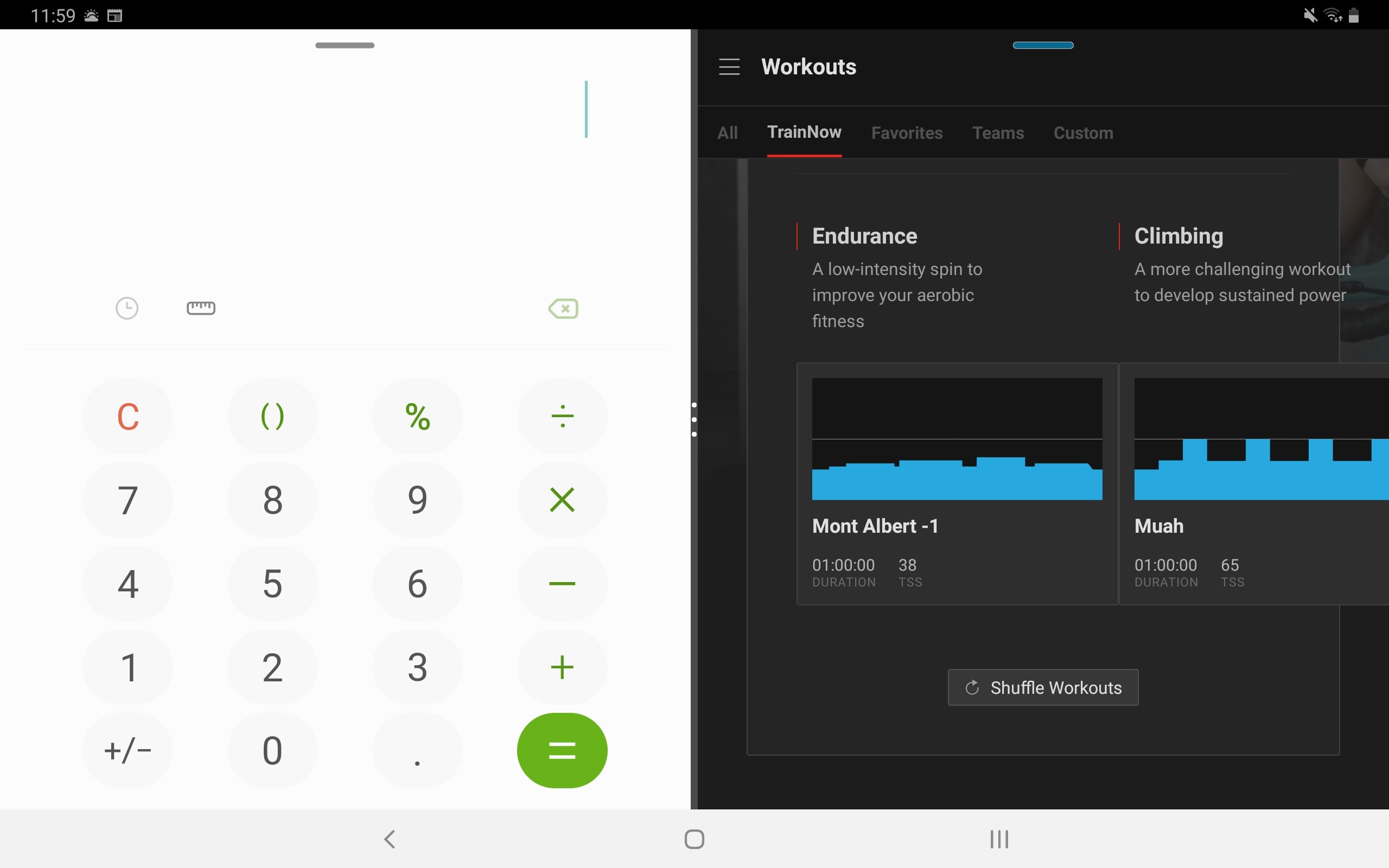
Galaxy TabS5e
Trainnow goes off the screen. Also menu screens do not respect landscape device orientation. Below screenshot actually taken while device in landscape… menus refuse to rotate.

1 Like
had the same today in the morning on my Galaxy Tab S4!

TR works good in Dex Mode?
You are using external TV?
I’ve had no issues running in dex. Mainly because I like to force the mobile portrait view. I’ve not tried TR to an external tv but it should be fine. The TV in my gym is only an old 720p though so it’s horrible. I could use dex and splitscreen interchangeably. Dex is probably a touch more reliable. Also both options stop the quitting on app switch problem.
1 Like
I’ve still got this going on with my device screen where my HRM is off to the right and un-selectable.
Google Pixel 5

1 Like
First bug I’ve encountered today. Got the black screen when starting the app. Uninstalled and installed which fixed that aspect. Then doing a workout powermatch did not work at all. Increased the intensity and for some reason power stayed at the same point even with gear changes. Switched to PC in the end to finish the workout off. Have a Huaweii P20 but no problems with it so far.
1 Like
App on Samsung Galaxy Tab S6 goes black / blank on start up.
1 Like
Thank you everyone all for the feedback. We’re actively working through our list of issues, and are still adding based on feedback. Please keep any suggestions or insights coming.
This newest build has a fix for the black screen issue that some of you have been experiencing, and that should not be a problem anymore. If you have seen that in the past, and are seeing it on the newest version please let us know!
Here’s a quick rundown of what was in this latest release (2021.6.0.92049)
•	Fixed a problem where the Workout Player would show landscape mode incorrectly
•	Correctly use system time to show End Time during a workout
•	Fixed a problem where athletes could see a permanent black screen upon opening the app
•	Fixed a problem where the keyboard would show during some selections
•	Fixed a problem where marking recurring workouts complete could duplicate them
•	Cleaned up a scenario where post ramp test FTP would be updated incorrectly
4 Likes
Has the logic for the portait view showing two sets of blue bars (i.e. overview and current interval) changed? I used to be able to force this on my tablet in split screen mode but tonight’s workout only showed me the overview as if it was in landscape mode (which technically the accelerometer would be telling it that it was).

I’ve found that the clipped text in landscape mode issue seems to be related to the font size setting in android system settings under display. If I have the font size set to large or largest I have the clipped text, but it looks correct with the default font size. This is in app version 2021.6.0.92049 on a Pixel 4a.
1 Like
Android Beta
JOB 005 UPDATE
DEVICES:
Tacx Neo 2T
Samsung Galaxy S9+
Garmin: Dual V3s, 1030, Dual chest strap HRM
UPDATE to JOB 005 posted 1 March
ISSUE: Power surges during intervals with changing pwr tgts is no longer happening was able to progress thru three subsequent workouts with no power surges.
ISSUE: HRM was dropping. It appears that that TR Device picks up and pairs two devices for the GARMIN HRM: 1.Garmin Heart Monitor 2. The acutal HRM chest strap device. When I dropped the Garmin HRM and left only the Cheststrap paired was when I had problems Solution added the Garmin HRM back and paired both of them and so far it has worked well.
thanks
Keep The Rubberside Down
1 Like
Android Beta
JOB 006
Devices:
Tacx Neo 2T
Samsung Galaxy S9+
Garmin: V3s dual sided, 1030, Dual HRM
ISSUE: Had power freeze during workout.
DISCUSSION: Today 5 March during the 2nd interval of Tallac +4 I expierenced a power freeze. TGT PWR was 227 but my actual pwr was frozen at 103. However, my cadence remained constant and the sensation was more demanding than 103 watts would suggest. This lasted approximately 40seconds then power went back to the prescribed workout pwr tgts and I was able to fnish the workout without further incident.
WAY AHEAD: Check Tallac +4s workout profile to see there is a problem within the 2nd interval,
1 Like
Yeah, I’m also seeing navigation issues with Android’s Back button (or gesture). It doesn’t always take me back to my Android home screen.
On a clean launch of TR, if I don’t tap anything, the back button will correctly go back to the Android home screen.
But if I navigate to a sub-screen, the first press of the back button will go back to where I was, but the second press won’t do anything…I’ll still be in TR.
To get out, I have to use the Android Home button (or gesture). TR should let you return to the home screen only using the Back button/gesture.
3 Likes
Hey Pete, how can you tell what version you’ve installed on an Android device? Thanks!
Edit: Ok literally took me 6 seconds after I hit post to find it:
- In the app, click hamburger menu, support
- Scroll down very bottom to see app version
1 Like
Seconded! Fonts too small in mobile apps is a perpetual bug-bear.
To add to @Bikr’s point about the mobile device typically being placed at a greater distance from the user during a TR workout than in regular use, there’s also the added issue about users possibly not typically wearing any usual reading glasses during a workout. Both issues can be alleviated by larger fonts. Not massive, just larger.
I never really noticed an issue with the old Production app, so please try to ensure the Workout screen in the new app is just as legible as it was in the old one 
1 Like
If the beta just is not working for you then I’d suggest going back to the released version personally.
3 Likes
If I’m not mistaken they have sent out en e-mail to everybody running TR on a device that won’t be able to run the new version of the app. I’m running TR on an old iPad, but a new Android phone so I only got it for the iOS app.