Would this still be a number in Watts? Something you could use to establish pacing plans etc for racing etc?
Yes in watts. For many users TTP™ is simply the ramp test estimate, or moving forward, the AI FTP estimate if you choose not to test with the ramp.
I still get that. But seems to go away after about 5 minutes.
I’ve been getting the “processing data…hang tight” message for the last half hour. I wait, but nothing seems to happen.
is your birthday set correctly?
I’ve also been getting the “hang tight” message for the last half hour. I’ve deleted the ramp test and added it again. Also deleted any manual FTPs from my recent history. Redownloaded trainer road too. Any other ideas? 
A (little) bit of FTP history. Generally I’d find I could push most workouts around 2-3% higher than I tested via the Ramp Test so after a couple of weeks would manually adjust the value. The next Ramp Test would usually sit a Watt or two either side of what I’d basically guessed. My last Ramp Test (cough) a long time ago put me at 272W. At the time Intervals.icu’s eFTP variously put me at 270-275W. Then last summer Intervals suddenly pushed my eFTP to 292W. When I returned to indoor training I decided to set my FTP on TR at 288W where it’s now been all winter. No particular reason, it was a sort of “split the difference” between my last tested and that particular eFTP but with a tilt to the latter.
Yesterday was to be a Ramp Test so I hit the prediction button and got 297W. Hmm, +/- 2% or so and it would have been a wash. I’ll go with this suggested value and see how things go.
Progression levels prior to the estimation (see, showing them in Strava does have its uses  ):
):

And after:
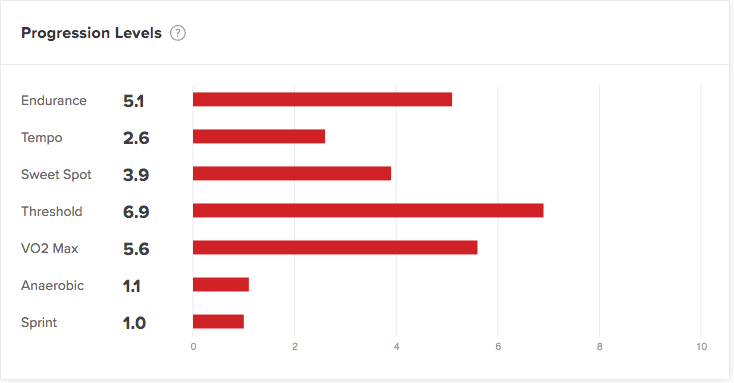
The only one that’s dropped is VO2max - 
I’m not sure those “after” progression levels are correct - keeping the threshold level up at 6.9 is odd.
I’m getting the same issue. Worked fine a few couple of weeks back but now seems to have issues.
I tried it yesterday in the middle of SSB1 after my last week of training felt underwhelming even the over-under. I felt like I could do much more. It bumped my FTP 6,7%. The AT adapted my PL accordingly and the scheduled workoouts accordingly. Today it felt just right. The new FTP in spot on and the workout progression too. Good job!.
Last night all I got was the “processing data…hang tight” message, but this morning the FTP detection worked fine. FWIW, my sense is that the FTP estimate is very accurate.
Anyone else kinda obsessed with scheduling ramp tests, peeking, then deleting the ramp?
I know I shouldn’t. I know I’m being bad. I know I’m doing wrong.
But it’s so tempting …
Seems spot on given where I’m at right now.

Someone probably pointed this out already, but the duration for the replacement workout says 25 minutes, but it’s actually a 45 minute workout.

Also, my new FTP was not updated when I selected “Accept.” Not a big deal. I updated it manually and–bam!–AT worked it’s magic after all of my progression levels went down.
I used FTP detection just after it was released and had a 10w increase from 270w to 280w. Since then work has been carnage and my sleep and training have been sporadic at best. There was a ramp test already in my plan for today, which I was expecting to do, especially given my lack of recent consistency. Out of interest I looked at the automatically detected figure and it gave me a boost of a further 4w to 284w. More than happy with that, so I accepted it and did the Goat Citadel workout I was offered instead. This was a stretch workout, increasing my VO2 max PL by 1.1. I’ve looked further ahead in my calendar and most of the workouts over the next few weeks are stretch, rather than productive (which is what I would expect). Anyone else seeing these increases in workout difficulty too?
Did you complete warlow?
It’s not until the weekend - hopefully I’ll grow into my new FTP by then? 
Ai FTP detect didn’t work for me.
I just took a week off post solo 24 hours in the old Pueblo, I mean absolutely zero workouts, so that might have something to do with it. I also was skipping indoor workouts for the two weeks prior to the race, and riding outside for funsies with that day’s workout in mind (no outside power data to transfer into TR) so that probably also affected the estimation.
However, I had been pretty consistent for the 2-3 months prior to the few weeks surrounding the 24HOP, and my ftp prior to race was set at 231. To be honest leading up to the race the workouts felt pretty easy, but I wasn’t going to mess with anything given the big event coming up.
Anyways, fast forward to yesterday, I used the AI detect and it dropped me from 231 to 227. It probably wouldn’t make a difference in the scheme of things, but it didn’t resonate with how I felt on the trainer pre race, so I did a 1 hr endurance ride to get my legs used to moving again, then today I did a ramp test. The test kicked me up to 236 which feels much more accurate, however the down side is TR reset my levels to 1.0 across the board.
I suspect it doesn’t matter too much in the scheme of things, and I figure there’s still some bugs to be worked out. Maybe my particular training history and breaks in indoor workouts doesn’t fit the algorithm.
Hoping one of the team members sees this and can use my data to further improve the AI detect, cause I’m stoked on the idea of not doing any more ramp tests 
Thanks team TR! Love the constant improvements y’all offer!!
231, 227 and 236 are all pretty similar numbers 
I do agree about the issue regarding all levels dropping to 1 - I don’t like that either.
I was a bit surprised myself TBH. I wondered if there was some caching/update lag between app and website but got home this evening, refreshed the career page and it’s the same values.
You might be in my bad books