Correct. The PL’s only adjust downward when your FTP changes in the TR account/app settings (be that from a test or manual adjustment).
Ok. good to know. But does it matter if it already stod on 1.0 besides vo2max that was 4.4 before the ramptest. Thinking if i would accept the lower ftp the PL would adjust itself.
According to the announcement, it shouldn’t matter - but I haven’t tested it in any great detail, only one ride yesterday evening so far.
Anyone else’s workout responses not saving? Thought this was addressed already, I’ve emailed about it twice and saw it mentioned here. Workout responses entered on MacOS app are not appearing on the site
Quick the TR app, and then relaunch it. That should trigger the survey response getting sent to the TR back-end.
The post ride survey response problem is a known bug to TR support / engineers.
As I understand it, extending cooldown will not currently affect your progression levels. Right now, the progression level is set based on the workout you do, and whether you pass/struggle/fail it.
It does not analyze the work you do (independent of the workout), and adjust your progressions based on that. The current AT is very tied to you doing a specific workout that has a predetermined level, and adjusting your progression level based on that workout level.
I hope that when analyzing non-workout outside rides is working that they can move to more of looking at the work you actually did, rather than focusing on what was assigned. Given the state of rating TR vs custom workouts, I think this is a long way off.
Where did you find option to update PL on custom ride? I was just added to AT this morning. I did a over 3 hour, 54-mile ride last Saturday. I tried to go in an associate it with a TR workout but don’t see a link or option for that. It did ask me to rate the ride, which I did.
Progression levels from a week ago:
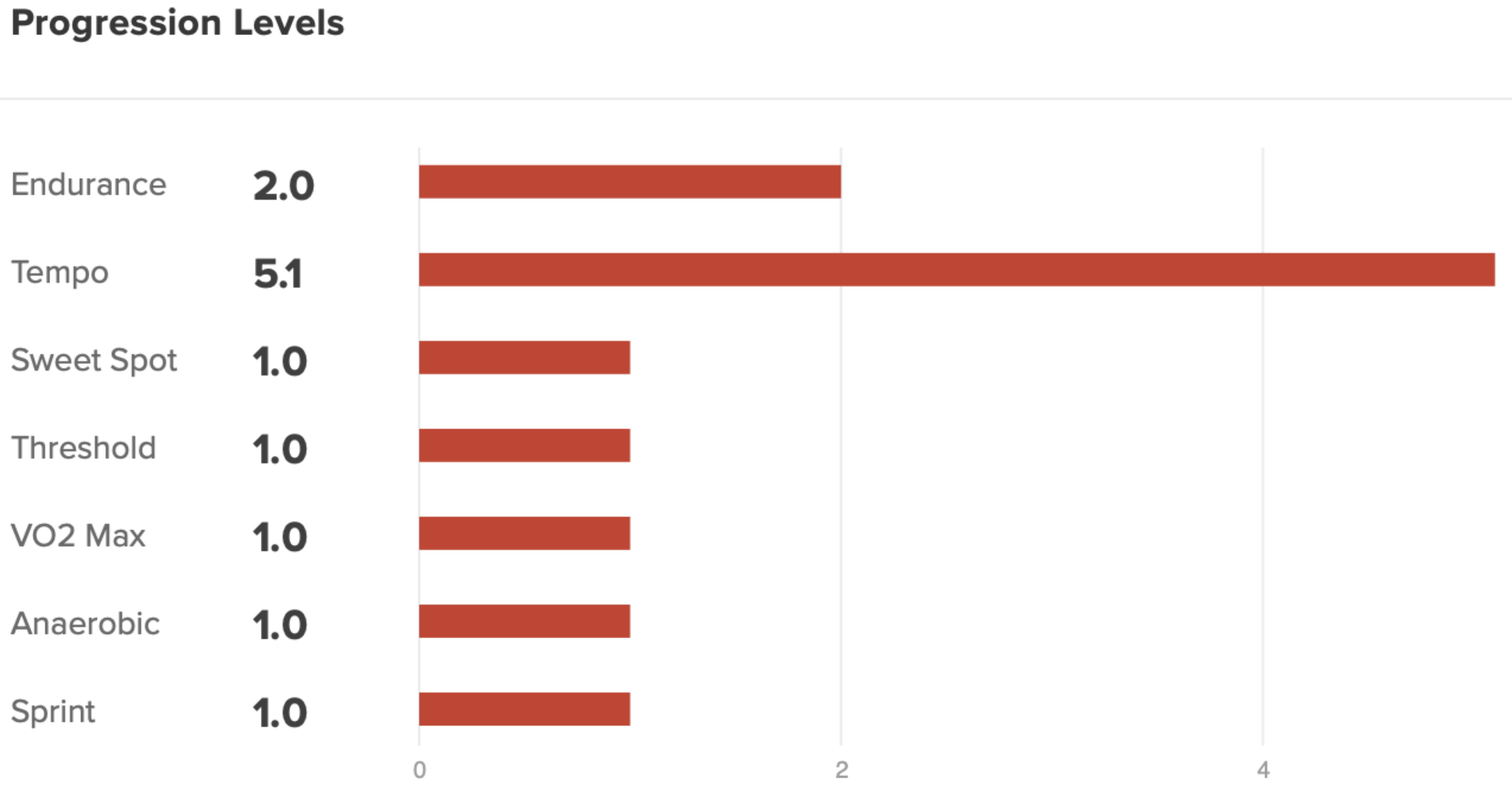
Last week because of smoke / bad air quality I only did two structured workouts using TrainingPeaks’ workouts on my Garmin:

and now:
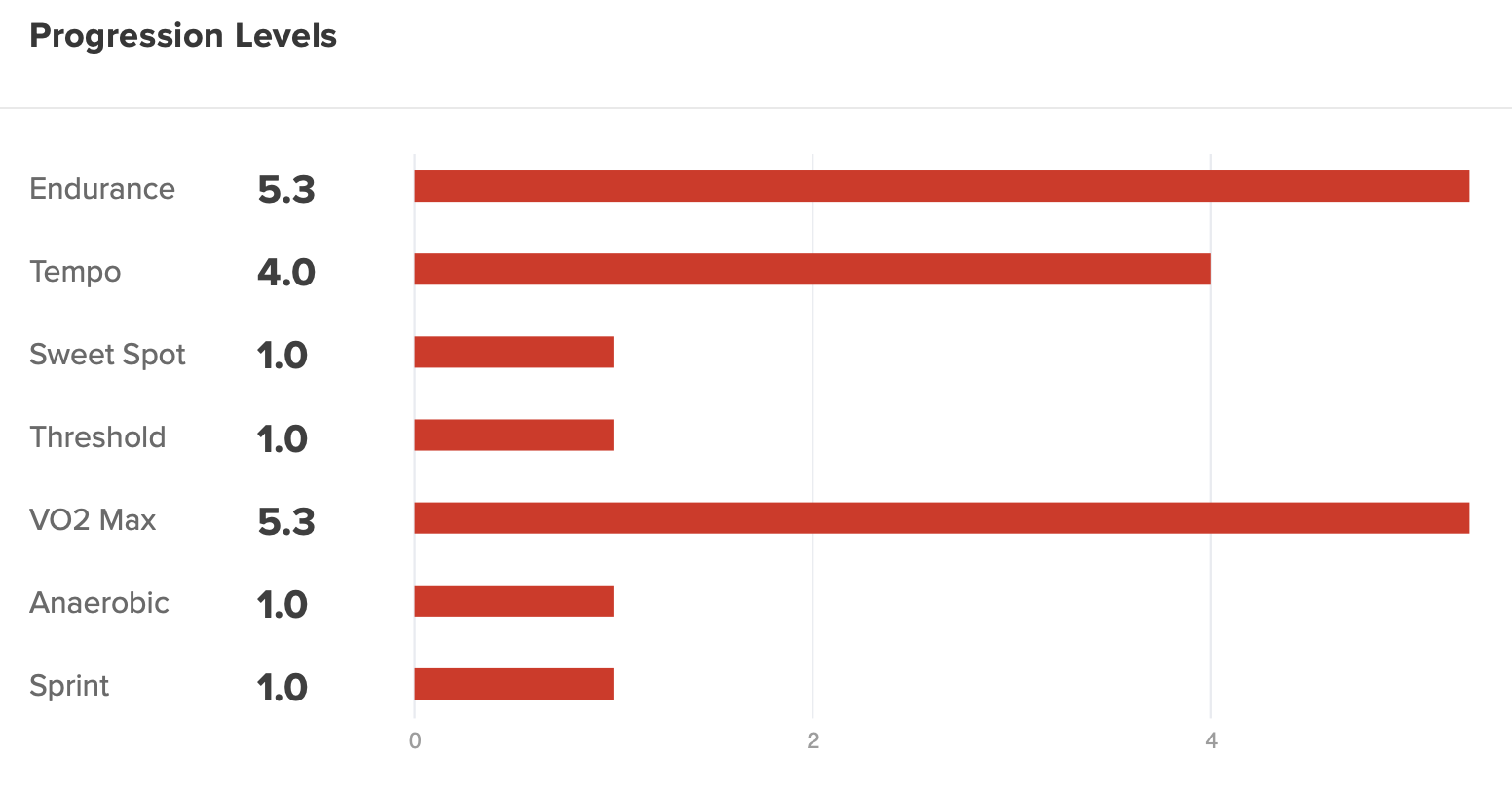
How it happened:
- my coach assigns a workout in TrainingPeaks
- TR pulls workout into TR custom library and calendar
- outside I use Garmin with TrainingPeaks workout to record
- after the ride, in the TR calendar I manually associate the ride with the custom workout
- somehow I magically got PL updates on Career page
so I have a week of SSB2 HV this week, and got served a 4.8 which was a ‘stretch’ given my 3.7 level which had decayed from 10 in June. I’ve gotta see how high I can go this week and get it back to 10, right??? I think I’ll do a 7.2 on Thursday (a 3x30 @ 85%, seems really doable actually) which is the highest stretch workout and we’ll see where we go for Saturday

Finally got in 
I rubbished my existing plan and built new one, however it’s given me a ramp test tomorrow and another ramp test next Tuesday.
For the ramp test tomorrow, what can I do without breaking things?
- Scrap it and do random ride
- Ignore it, do random ride and associate it
- Ignore it, do high intensity ride and associate it (don’t want to do this)
If you do do something, which breaks AT, is it apparent, or how do you know?
I will also ctrl+f ‘move future workouts’ but in response to this if anyone can 2 seconds tl;dr that, that would be great. Thanks.
this one has worked for me in the past.
Out of curiosity, why not skip the one next Tuesday?
Agree with this, just skip whichever one you want to skip and do another workout if you want. I’ve not seen this breaking anything, all it means is your FTP wont’t change and your PLs won’t change - probably exactly what you want, depending on when you last tested and where you’re at.
I wouldn’t associate some other ride to the ramp test, that doesn’t make much sense.
Thanks, I did a high intensity ride yesterday and am pretty fatigued so would like to rest a bit before next ramp.
I got in today too but didn’t start a new plan as I just started one last week with a long term A event. How different does your new plan look from the old? Thinking of restarting as well and wondering if it’s a big shift. My adaptions to current plan were minor on AT.
what I did is I went and added a TR ride to the days I did outside workouts. I did this on some rides after the rides had been uploaded and then I just associated the outdoor ride with the TR ride and it worked for me.
I was added yesterday. Had som trouble activating it, but turns out there where an error i my “role” in the TR system. Support fixed it within muntes after reaching out
Going back to the workouts i have done to make responses, this one which had some power drop outs in the beginning (using powermatch, so the resistance was there all the time). I got this query;

It seemed to me that the question and answers dont match. If i answer one of them i get this;

The answers of the two querys look mixed up
Is this something wrong on my end, or is it a support issue?
I’ve never had that “How did this effort feel” option.
It probably was triggered by power drop outs which looked like I struggled. I have edited the post some.
&
Of all of AT’s various components I would’ve thought that the logic driving the UI/display of completed workouts and rides within the calendar was one of the more straightforward bits, and I’ve been surprised to see the coming and going of multiple bugs in this area and inconsistencies between mobile/web.
I’m ex-software so I do realise stuff is always (much) more complex internally than things appear to an onlooker, but still, it’s disappointing to see repeated issues emerging in this area. Relatively simple UI issues like this can cause disproportionate amounts of user confusion and lead to Support being contacted etc, wasting everyone’s time, so I’m sure TR aren’t happy about this stuff either. Usually, no one wants bugs fixing more than than the developers themselves…
Yes, it looks like the survey responses have been presented to you in the wrong order - definitely contact Support about that!