TrainerRoad AI Training Simulation gives you a live view into how your plan will evolve over the next 4 weeks. It looks at your recent rides, current fitness, recovery needs, schedule, and goals, then runs performance simulations to choose the next best workout and show what comes after. When you change anything on your Calendar, the system re-simulates and updates future days one by one, so you can see how today’s decision shapes tomorrow’s training.
Every time you complete a session or edit your Calendar, the system re-simulates and updates your 4 week Simulation Window. You can see how today’s choice affects upcoming training, how hard key sessions are likely to feel, where recovery is needed, and how your projected FTP is trending.
How does TrainerRoad AI recommend workouts differently from Adaptive Training?
Adaptive Training adjusted your plan after each workout based on how you performed. It relied on a more linear, stepwise progression: if recent sessions were completed well, upcoming workouts generally increased in difficulty; if you struggled, the system reduced intensity to protect consistency. This reactive logic used your power data and post-workout surveys to keep training challenging but manageable, and it helped many athletes move forward and stay consistent.
TrainerRoad AI builds on that foundation by digging deeper into the ride data with a predictive, simulation-driven engine. It considers your training history across power, heart rate, and RPE, along with your schedule and goals, then runs hundreds of simulations to find the best training options. It selects the workout most likely to drive long-term progress while keeping fatigue in check and showing why it was chosen.
Why predictive simulation is better for real life
Life is unpredictable and progress is not always linear. Big group rides, travel, life stress, and obligations can all affect your ability to nail your training. With simulation, you can replace a session, shorten or extend a workout, or add an outdoor ride and immediately see how the coming weeks adjust, where recovery days appear, how hard key sessions will feel, and how your projected FTP changes. This turns training into a clear, low-friction process: make a choice, see the downstream effects, and train with confidence as you work towards your goals no matter what life brings your way.
The shift from reacting after the fact, to planning with foresight is the biggest upgrade, and we have made many features to leverage that advantage for you.
Training Simulation Window
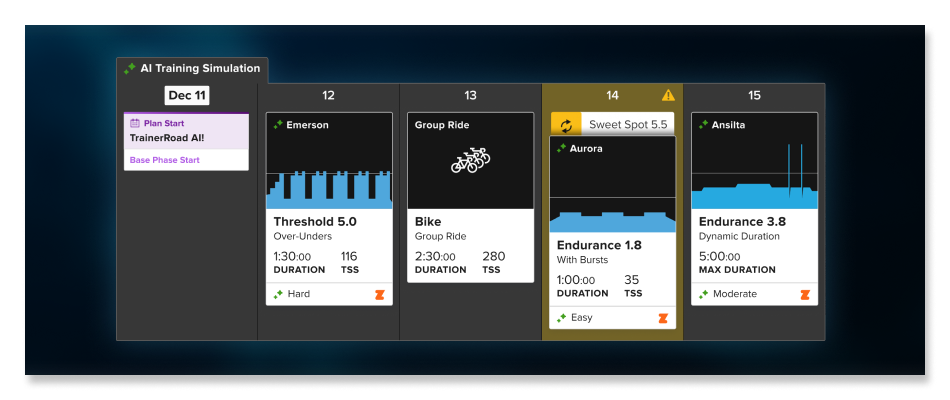
TrainerRoad AI Training Simulation gives you a live view of how TrainerRoad AI is working to make you faster. It’s a forward looking view of TrainerRoad AI, and a powerful tool for understanding and influencing your training.
Workout Extension
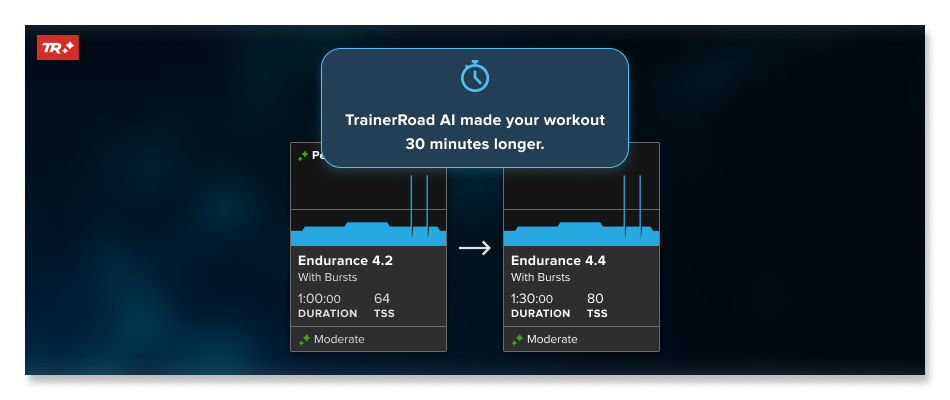
When you are nearing the top end of difficulty for a workout within a specific zone at a given duration, TrainerRoad AI will progress you by gently extending the duration. Instead of only pushing intensity, it adds a small, data-driven amount of time in zone to keep adaptations moving while protecting recovery. Extensions respect your training approach, and your recovery needs. You will see this as a suggested change on your Calendar. Keep the extended workout to continue progressing, choose an alternate if time or energy is tight, or revert to the original plan.
Predicted Difficulty
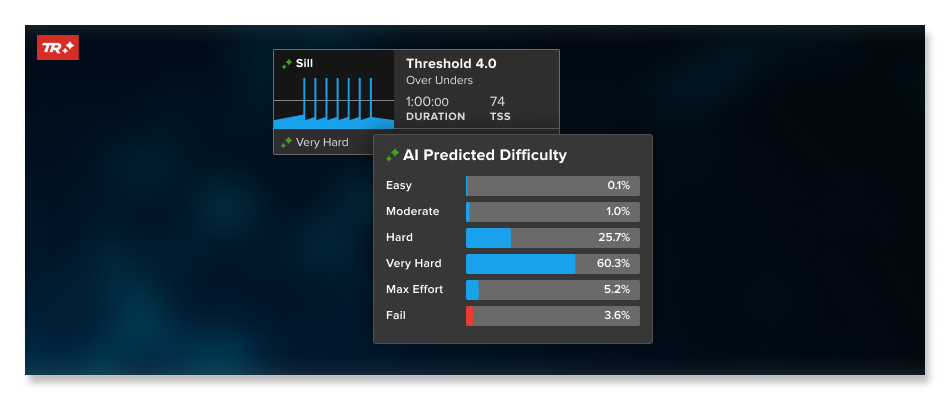
Previously, your Calendar labeled how a workout would likely feel using a proxy from progression levels relative to the workout. That was helpful, but limited to linear signals.
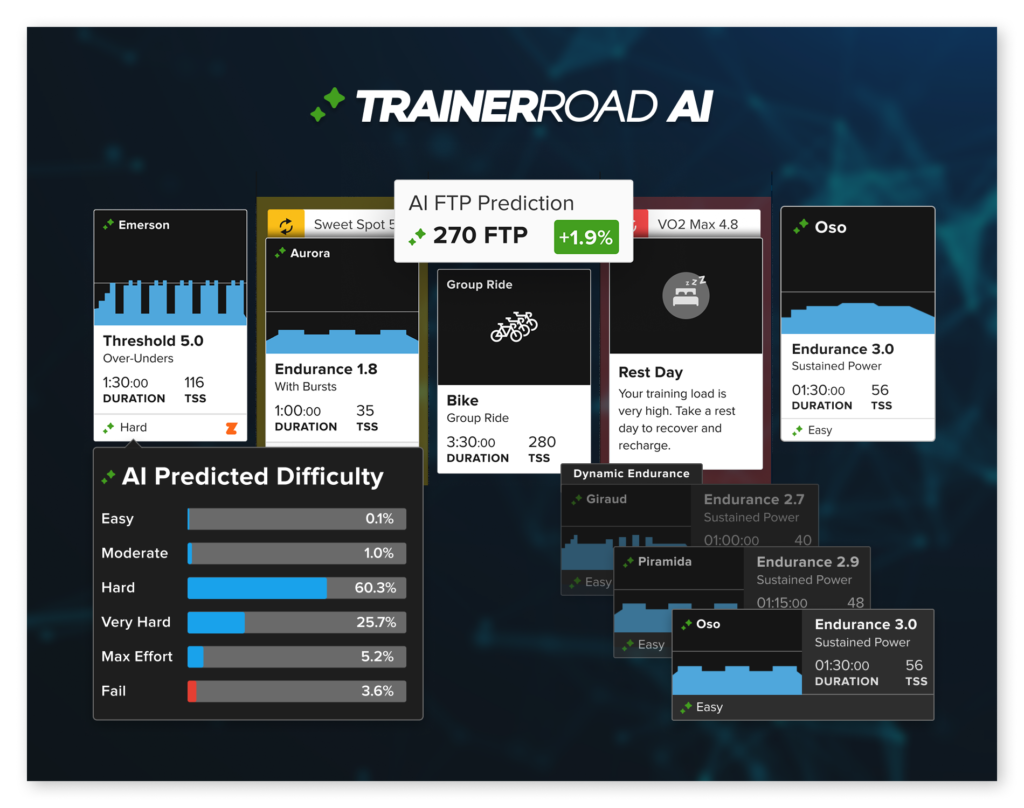
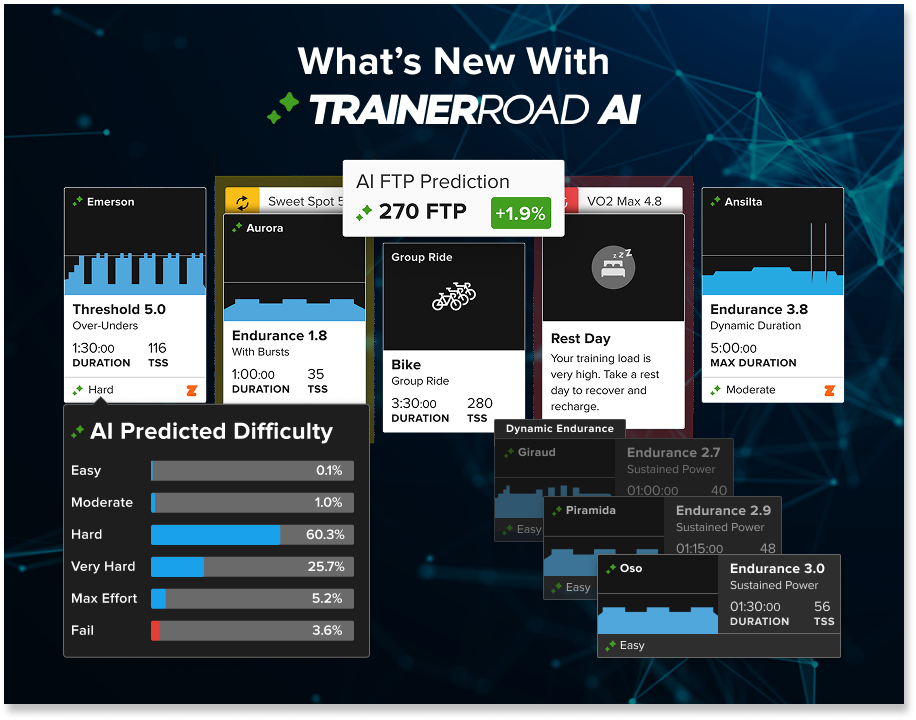
TrainerRoad AI goes further by learning from your training history across power, heart rate, and RPE, then running hundreds of simulations to predict how a specific session is likely to feel for you before you start. You can view the likelihood that a workout will feel Easy, Moderate, Hard, Very Hard, Maximal, or Fail, which makes the “why this workout” clear.
These predictions live inside your 4 week Simulation Window and update the moment you complete a ride or edit your Calendar. That context lets you prepare fueling and pacing with confidence, choose an alternate when needed, and understand how today’s effort supports the next few weeks without losing momentum.
Learn more about predicted workout difficulty here.
Updated AI FTP Detection
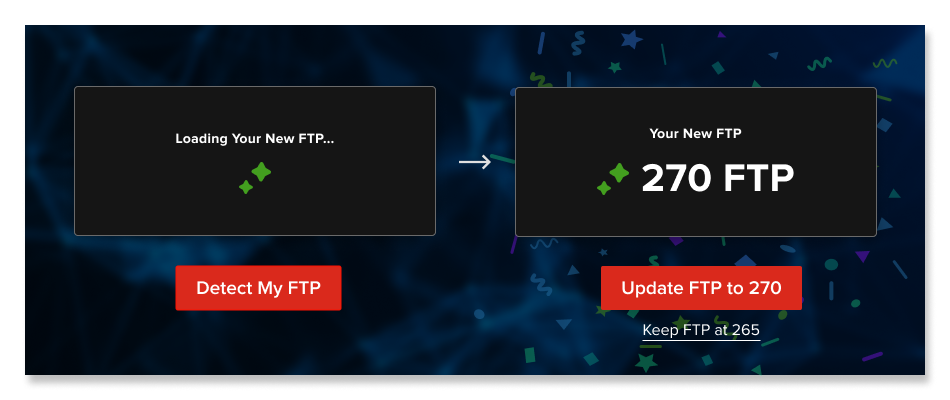
FTP Detection is now faster to calibrate, more resilient after time off, and smoother for first-time setup. It uses your training history to keep your training zones accurate and your workouts productive, while your 4 week Simulation Window shows where your FTP is likely to land next.
If you already have power data: you no longer need a fixed set of 10 indoor rides to calibrate. The system can detect FTP from your existing files and keep it current on its regular cadence, so you keep training without extra tests.
If you are returning from time away: FTP is tracked more accurately through detraining and reconditioning. The model sets a realistic starting point and scales as you respond, making it easier to come back without overreaching.
If you are new to power data: take a single ramp test. TrainerRoad AI anchors from that result, learns quickly from your rides, and provides dialed recommendations that match your capacity while you build history.
What is TrainerRoad AI Doing to Find my FTP?
TrainerRoad AI only sees raw power, heart rate, and RPE; it then figures out the next best wattage for you in your workouts to keep you progressing. We do this by running hundreds or training simulations to find what will improve your performance the most. After that, we translate those watts back into FTP and workout levels so they’re easy for athletes like you to use and understand.
You will see your upcoming detection on the Calendar, along with a live projection of where FTP is trending. As you edit your plan or complete workouts, the projection updates, so you always know how today’s work is shaping your next detection.
If you want to dig deeper into how the new AI FTP Detection works, check this article out.
AI FTP Prediction
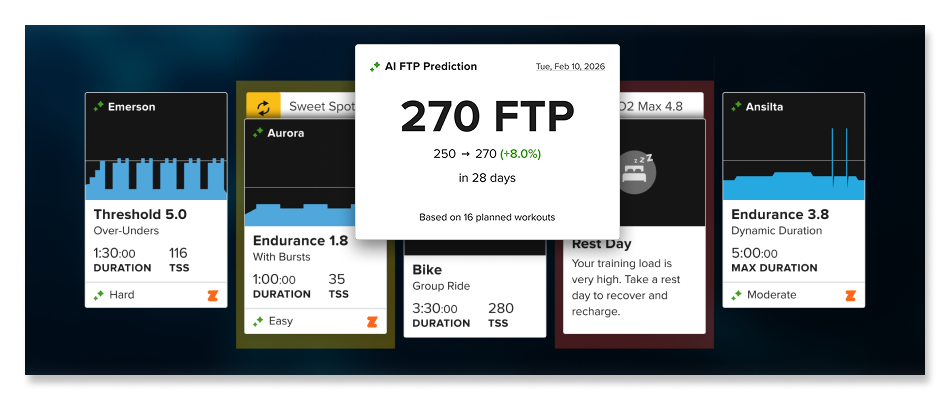
You can now look ahead and see where your FTP is likely to land with AI FTP Prediction. Inside your 4 week Simulation Window, TrainerRoad AI projects your future FTP based on your recent rides, current plan, and any edits you make. Move a workout, add a big ride, or change intensity and the projection updates in seconds so you can see how today’s choices shape tomorrow’s fitness.
This live outlook helps you make better decisions. If the trend flattens, you can adjust the training approach to be less or more demanding to see what will help. If it is climbing, you know to stay the course. You will also see when your next detection is due, so you can line up key sessions, recovery, and fueling to arrive ready.
In practice, this means less guessing and more purposeful work. Plan big rides and understand the effects they will have on your progress, and watch your projected FTP respond as you train.
Predictive Fatigue Detection
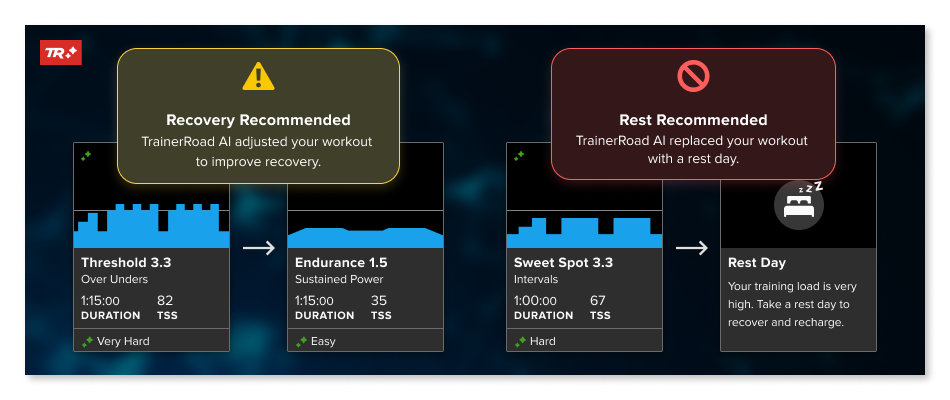
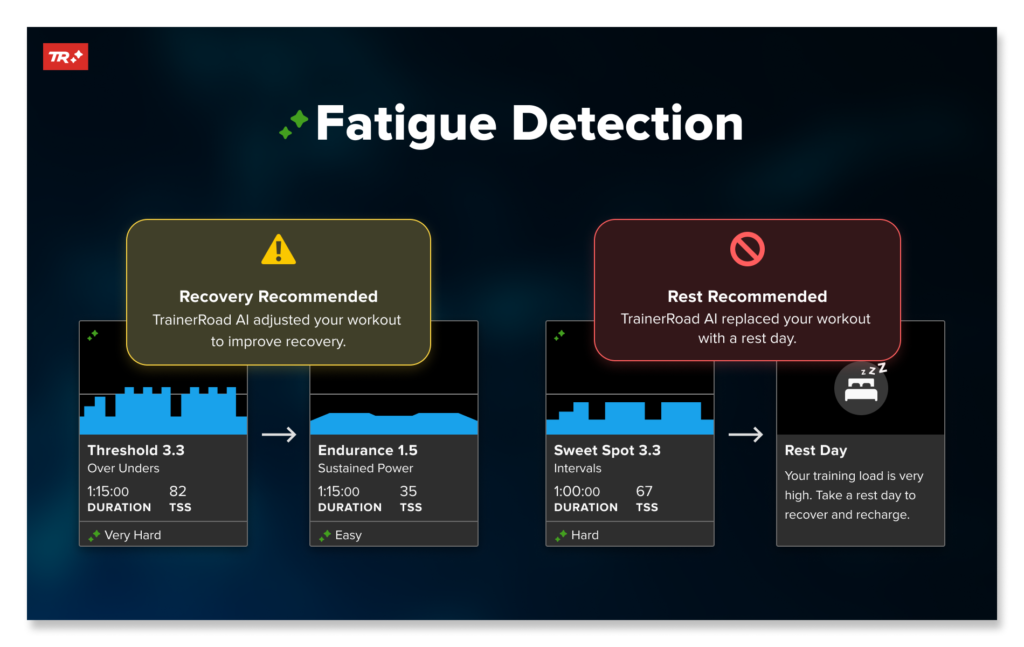
Fatigue Detection now works in the present and in the future. Inside your 4 week Simulation Window, TrainerRoad AI detects and predicts fatigue from your recent rides and planned training, then shows recovery needs and recovery days before they are required. It uses your training history across power, heart rate when available, and RPE to estimate how you will adapt to upcoming training.
This foresight lets you see how today’s choices change the weeks ahead. Add a big outdoor ride, extend a session, or stack extra endurance and watch the window update in seconds. You will see when recovery becomes necessary, how key sessions later in the block are affected, and how your projected FTP trends, so you can plan fueling, sleep, and scheduling with confidence.
You remain in control. Accept a recommended recovery day to protect consistency, or revert it on the Calendar if circumstances change. If you prefer, choose an alternate that keeps the day’s intent within your time and energy. The moment you decide, your plan re-simulates and the 4 week Simulation Window reflects the new path forward.
Updated Workout Level Scoring
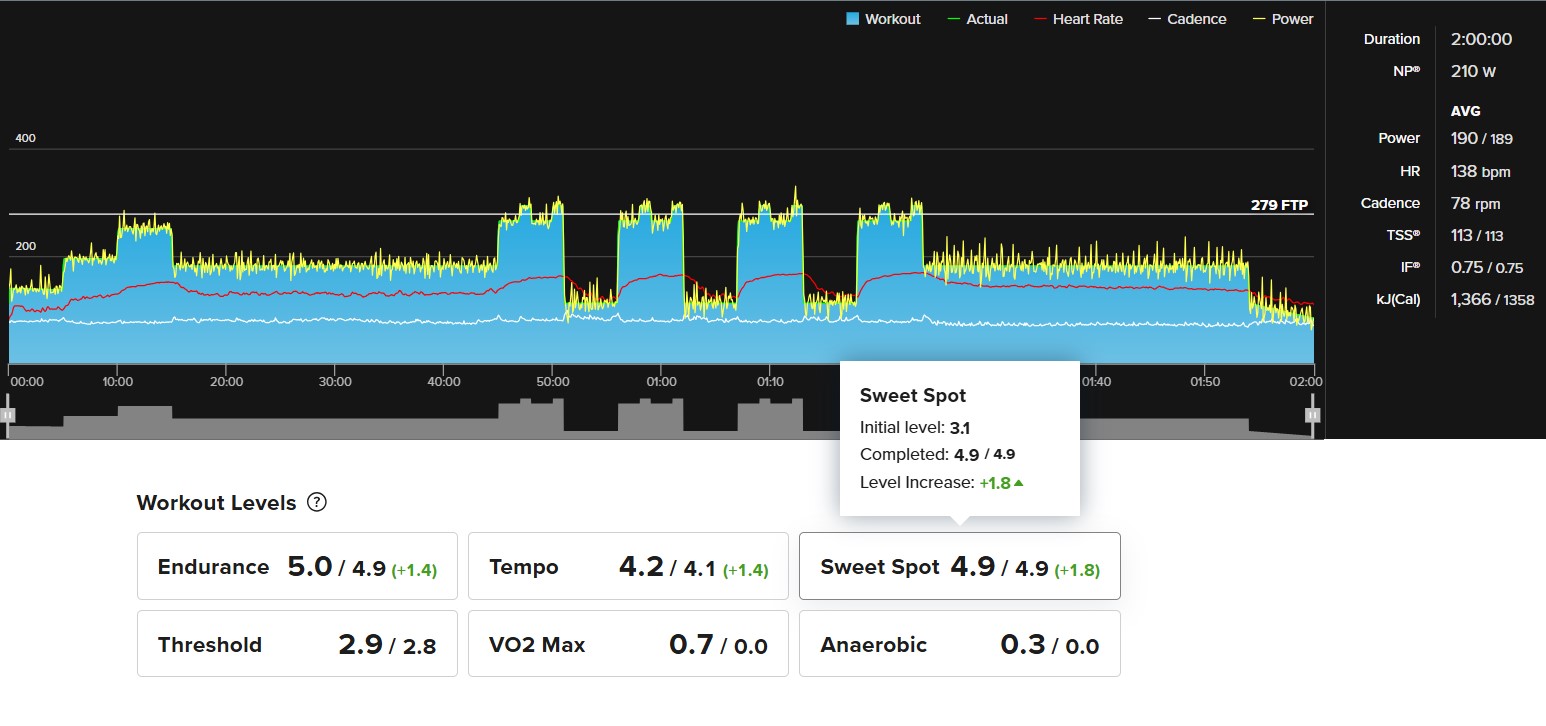
Previously, Workout and Progression Levels helped inform which workouts you received. With TrainerRoad AI, selection no longer relies on those scores; recommendations are chosen by simulation using your training history (power, heart rate, and RPE), your schedule, recovery needs, and goals to find the option most likely to drive long-term progress. But that doesn’t mean Progression Levels aren’t useful. They show how you are developing in each zone and give clear feedback alongside your 4 week Simulation Window.
What changed: the system now reads workout execution with more nuance. It better accounts for how you completed intervals, time in zone, small or big intensity changes, and shortened or extended efforts. If you pushed a little harder, or dialed things back, your Progression Levels reflect that with more precision.
Why it helps: you get a more accurate metric of your strengths in zone, so you can celebrate real gains and spot where to focus next. This clearer feedback pairs with your 4 week Simulation Window and Predicted Difficulty, helping you prepare, recover, and keep moving toward higher FTP and more PRs.
Note: With this update, even if you nail a workout, PLs for some workouts can vary slightly(+-.1-.3) from what is displayed as the workouts PL.
TrainerRoad AI Workouts
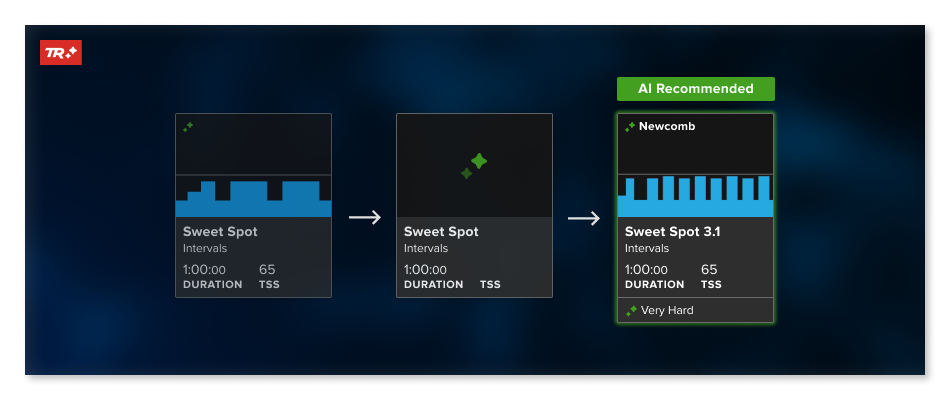
Don’t want a full plan but still want structure? TrainerRoad AI Workouts let you take a structured approach on your terms. Use TrainNow (now AI‑powered) to get a tailored workout any day, or add an AI Workout directly to your Calendar:
With AI Workouts, you’re choosing a workout type rather than a fixed session. Select the discipline, duration, and format of the workout you’d like to complete and TrainerRoad AI will run hundreds of performance simulations in seconds to find the best workout for you. You can even make scheduled sessions recurring weekly or monthly. The result is smarter, more personalized training that adjusts to you.
When you click Workouts in the TrainerRoad app it will open the workouts page where you can filter between Category, Zone, or List (classic library). Under Category, workouts are listed under specific workout intention: Endurance, Climb, Attack, etc. In those lists you can pick the type of workout, intervals, steady power, over-unders, etc. Once you choose your workout, TrainerRoad AI will find the best workout of that category and workout type for you. Under Zone, it is similar but athletes can choose between training Zones and then their desired workout type, giving you an optimized workout for your fitness. The list is the classic workout library and filters.
Every workout in a TrainerRoad plan is also recommended by TrainerRoad AI, forming a connected system of simulations that drive steady progress toward your goals. With TrainerRoad AI Workouts, you get the right structured workout on demand.
Plan Builder Updates
Updated Training Approach
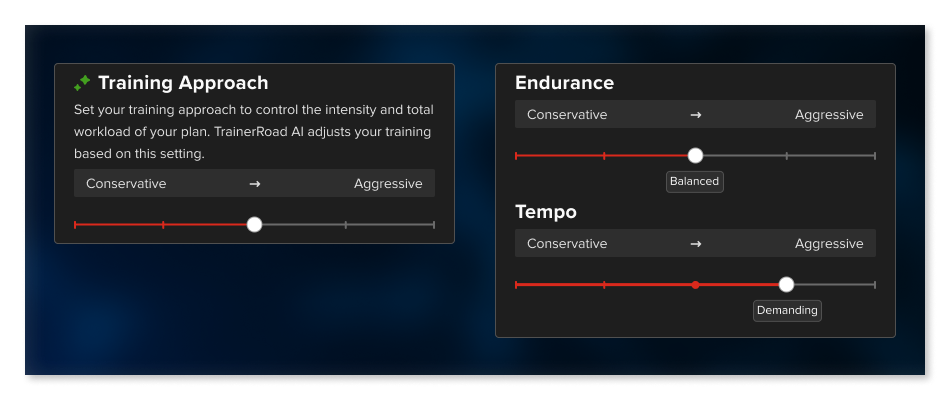
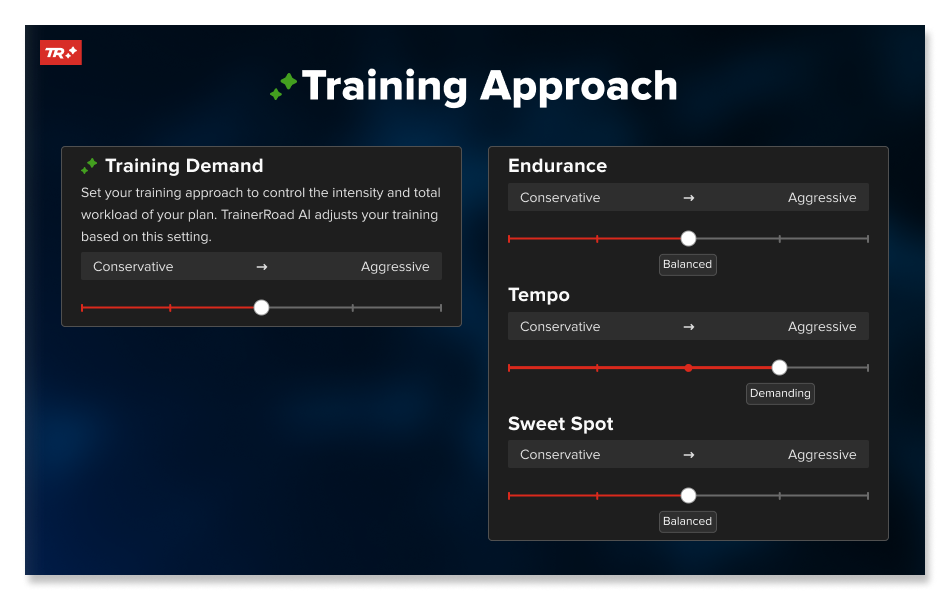
The Training Approach in Plan Builder sets the overall tone of your plan. It is the control you use to decide how hard you want to train. Dial it to match your current capacity.
- Turn it down when time and energy are tight so you keep momentum without overdoing it. If work, travel, stress, or limited sleep cut into recovery, choose a less demanding setting to stay consistent.
- Turn it up when you can recover and fuel well so added intensity converts into real gains.
TrainerRoad AI uses your approach settings in your daily recommendations and re-simulates your plan the moment you change it, showing the effects across your 4 week Simulation Window, including predicted difficulty, recovery needs, and your projected FTP.
Dynamic Endurance

You can set the maximum duration for your longer endurance workouts. TrainerRoad AI will scale those rides gradually toward your chosen cap as fitness improves, building aerobic capacity without tipping into excess fatigue. If you are working toward a longer event,TrainerRoad will make recommendations automatically based on your event length.
This helps you progress to longer durations at a sustainable pace. You can adjust the maximum at any time to fit your goals and schedule. This setting does not change the length of easy spins intended for active recovery. Any change you make is reflected instantly in your 4 week Simulation Window, so you can see downstream effects on future training, recovery days, and fitness trajectory.
Updated Workout Alternates
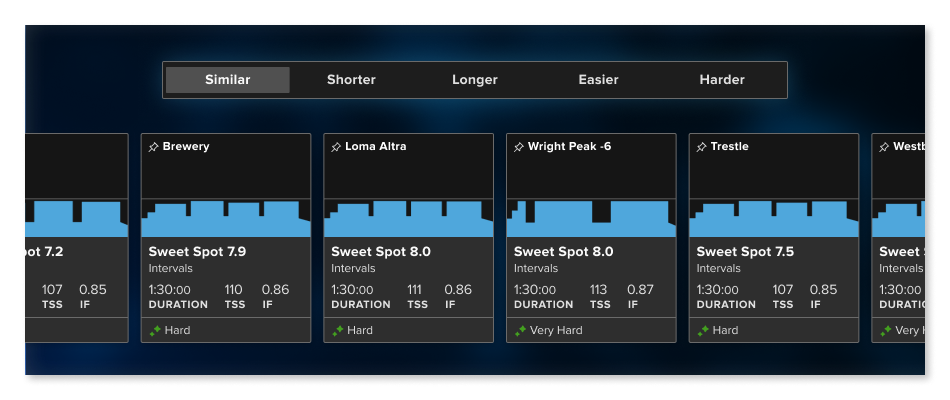
When the planned workout is not the right fit for your time or energy, TrainerRoad AI offers Workout Alternates built from the same AI simulation recommendation engine. You will see options that are similar, easier, harder, shorter, or longer, each chosen to keep the day’s intent intact while matching your capacity.
Choose an alternate from the workout drawer and your plan re-simulates immediately. The 4 week Simulation Window updates to reflect downstream effects on upcoming sessions, recovery days, and your projected FTP. If the change is not what you want, pick a different option or revert to the original.
This keeps training practical on real-life days. Short on time, low on energy, or feeling great and ready for more, you can adjust without second-guessing and keep momentum toward your goals.
App Updates
Career Page updates
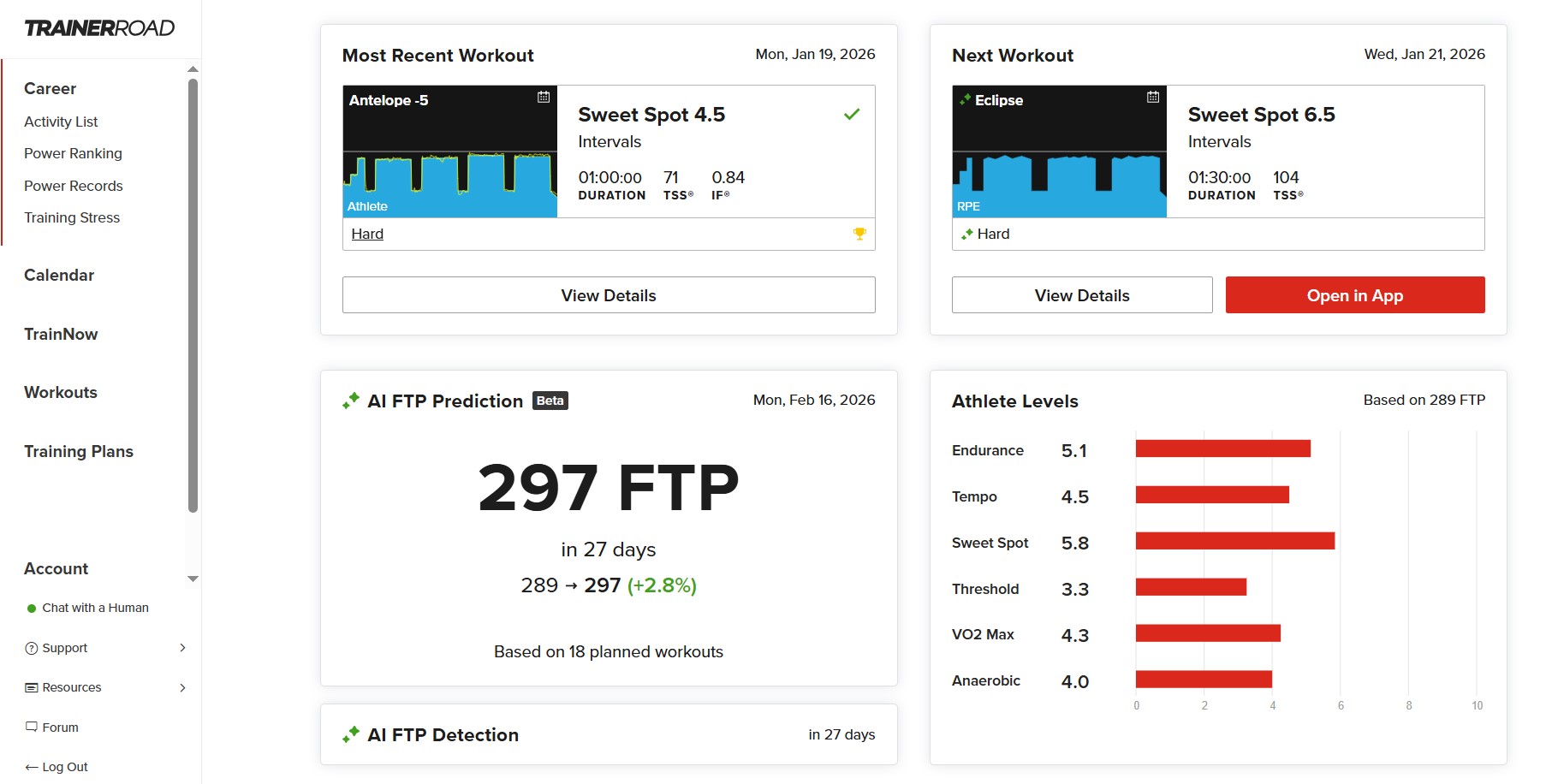
The Career page is organized to give you a clear snapshot and a single next action. At the top you will see your recent activities and Today’s Workout pick, followed by your Progression Levels, your plan and events, and a concise training overview. This layout makes it easy to review what you just did, start what is recommended next, and understand how your fitness is developing, all in one place. From here you can open your Calendar to view the 4 week Simulation Window and see how today supports the weeks ahead.
Updated Workout Drawer
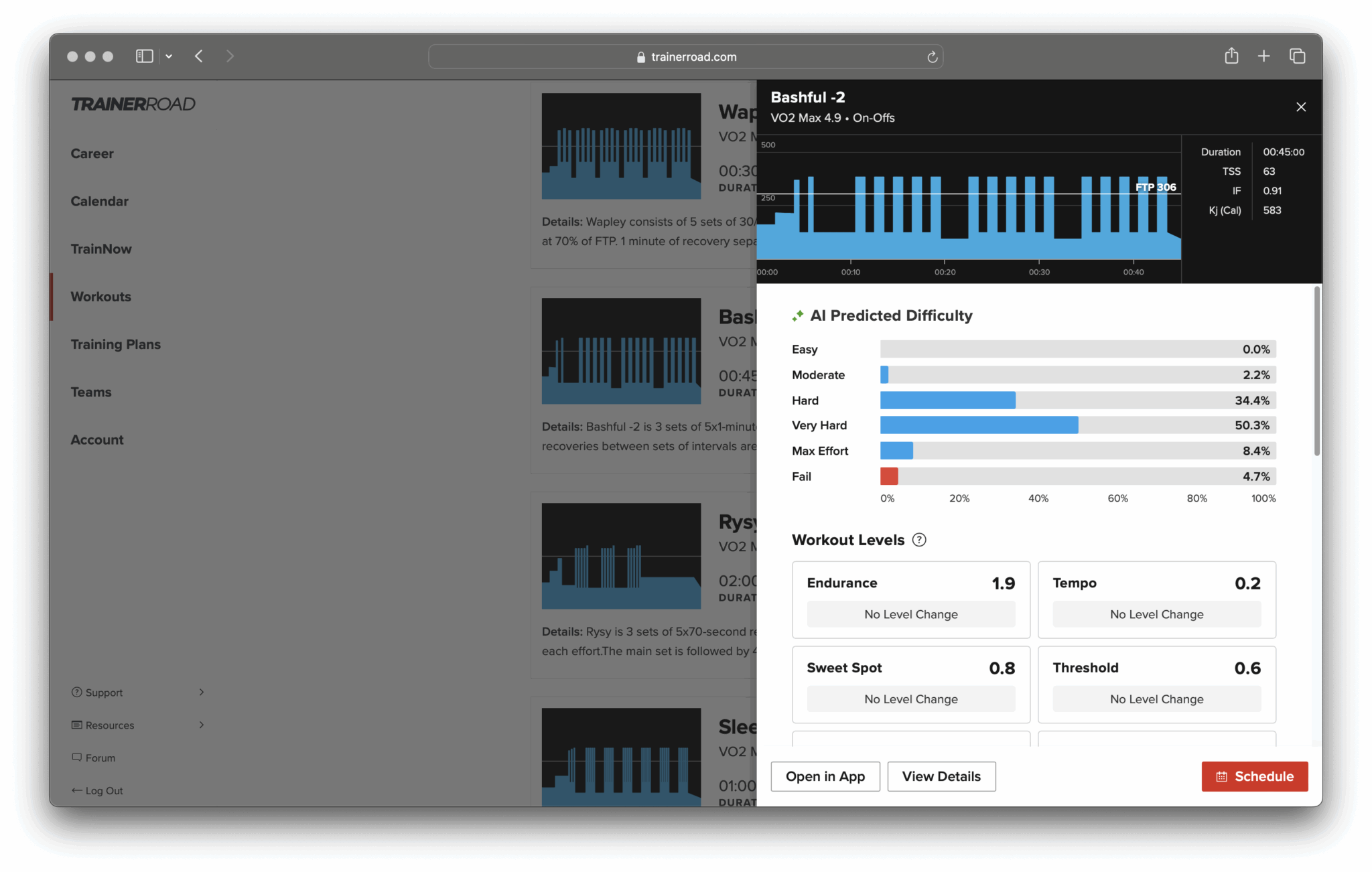
Open any workout to see richer context at a glance. For upcoming sessions, you will see Predicted Difficulty so you know how the workout is likely to feel and can prepare fueling, pacing, and recovery accordingly. For completed sessions, you will see the associated Progression Levels, giving you clearer feedback on how the work you did contributed to improvement in each zone.
Power Records
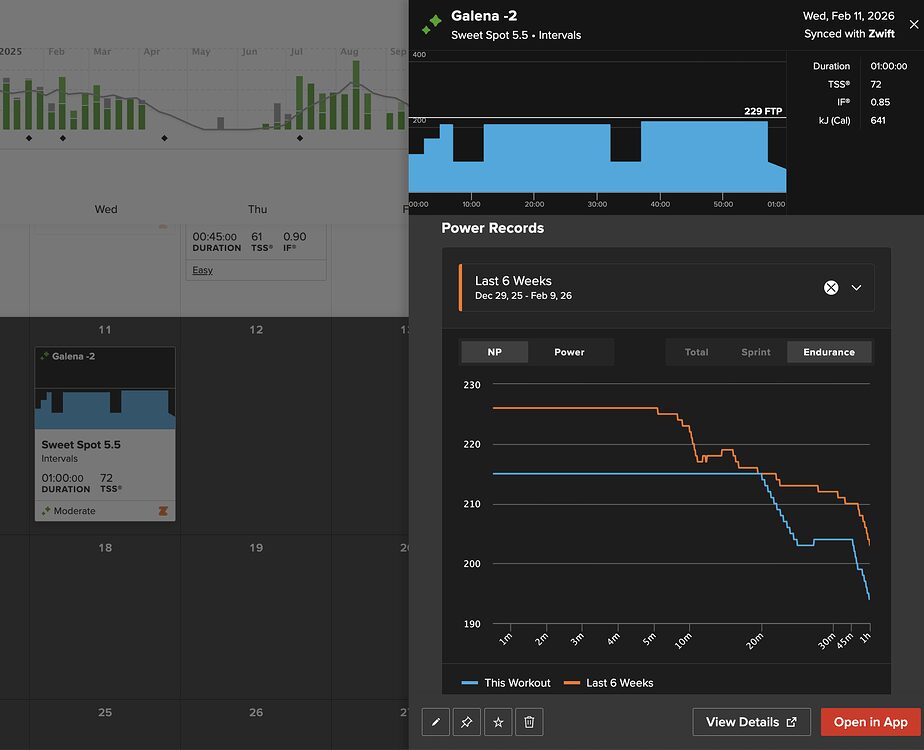
Power Records plots the workout’s power curve against your best efforts at each duration. The blue line is the workout. The orange line is your personal bests from the comparison period. At a glance, you can tell whether a workout is asking for power you’ve already proven you can do, or whether it’s pushing into new territory.
Instead of guessing whether a workout is appropriate based on FTP alone, you can see exactly how the planned watts compare to what you’ve recently done.
All of these updates are available across all TrainerRoad apps and platforms.
When planning on desktop, you can pin a workout from the right-click menu for quick access later. These updates keep preparation simple, adjustments easy, and your plan coherent as your schedule changes.
Know how fast your training will make you before you even get on the bike. Head over to TrainerRoad.com and start exploring TrainerRoad AI today.
Train with data, not guesswork. TrainerRoad AI: Built to Make you Faster.
Learn More About TrainerRoad AI Features:
- Introducing TrainerRoad AI
- AI Training Simulation
- A Data Driven Explanation of the New AI FTP Detection
- AI FTP Prediction
- Predicted Workout Difficulty
- Improved Fatigue Detection
- TrainerRoad AI Workouts
- Training Approach
- Dynamic Endurance
- AI Workout Alternates
- Power Records
- How TrainerRoad Builds Custom Training Plans
What Athletes Are Saying
We’ve been testing it with real athletes and their feedback has been amazing.
— — —
“Because of TR AI, I don’t have to worry about over- or under-shooting my workout goals. It all just works, and I can tell ahead of time what will work best. I love that I can see how changes to current workouts (e.g. going longer/harder than expected on an outdoor ride) change upcoming workouts even several days out.” — Drew O. Beta Tester 👩💻
— — —
“TrainerRoad AI has transformed how I approach my training. I didn’t think there was much room left to improve my TrainerRoad experience but these new features have changed that. They’ve made the entire process feel more intuitive and engaging.
I don’t have to second guess the workout choices, progression, or whether I’m doing the “right” thing. The system understands my capabilities and adjusts with a level of precision and transparency I haven’t seen before. It’s taken the mental load off completely, leaving me free to just focus on doing the work.
TrainerRoad now feels like a true training partner, one that listens, adjusts, and supports me in a way that keeps me motivated and confident. In terms of performance I’ve gone from 3.99w/kg to 4.2w/kg during the course of beta testing. Crucially my FTP is equal to my highest recorded which was 3 years ago. Not bad for a 42 year old. I’m excited to find what further improvement I can make before my A-event in 4 months’ time.”
— Kevin W. Beta Tester 👩💻
— — —
Kevin & Drew’s experiences demonstrate the clarity and flexibility of TrainerRoad AI in how it removes barriers and brings performance improvements.