How Does TrainerRoad Adjust Your Training Plan Automatically?

TrainerRoad adjusts your training plan on its own immediately after every ride you finish. When you save a ride or any change takes place on your training calendar, TrainerRoad re-simulates the next four weeks of your plan to make sure your upcoming workouts are optimal for making you faster. A big group ride, a missed workout, an unplanned ride, or a stretch of fatigue changes the workouts that come next, and it all happens automatically for you in the background.
If you have ever trained on a fixed plan, you know the problem this solves. Something comes up, the plan does not move, and by Thursday you are behind and trying to catch up. If you have worked with a coach, you know the other version. You message them, wait for the reply, and pay for the time it takes to rework the week. This post walks through the four things that most often knock a week off course and shows what TrainerRoad does about each one.
Does TrainerRoad Adjust a Fixed Plan, or Build One as You Go?
TrainerRoad builds your plan as you go. When you set up a plan in Plan Builder, you tell TrainerRoad what you are training for, how many days you can ride, and how long you have on each of them. The goal can be a race or something that is not a race, like raising your FTP or getting better at long climbs. From that, TrainerRoad lays out the shape of the plan, meaning the phases you move through and how long each one lasts, so you know what kind of work is coming and how far out your goal is.
The workout on each day is a different matter. TrainerRoad does not fill those days in once and leave them. Before every workout it re-simulates your plan across every workout it could give you and predicts how each one would go for you, based on the rides you have done. Then it picks the one that best fits your current fitness and the phase you are in, with the goal in mind the whole time. The changes can be small, like a workout stepping up or down a level, or drastic, like an interval workout becoming a rest day. When your fitness and your recent load call for the big change, TrainerRoad makes it.
How Does TrainerRoad Know When to Adjust Your Plan?
TrainerRoad adjusts your plan whenever something on your calendar changes, and the change you make most often is finishing a ride. Every ride you finish feeds back into TrainerRoad’s AI, informing and adjusting your upcoming workouts. If the ride took more out of you than planned, or felt easier than expected, the workouts after it move to match.
You can watch this happen. The next four weeks on your calendar are the AI Training Simulation, a live view of the workouts TrainerRoad currently expects to give you. Save a ride, and the days after it update right there. TrainerRoad looks at the load you just added, how you rated the ride in the post-workout survey, your schedule, and the goal your plan is building toward, then picks the workouts that keep you on track. The way TrainerRoad picks a workout and the way it adjusts one are the same process.
Four ways your plan adjusts
What happens on your calendar, and what you have to do
Your part is the same every time: ride, save, and answer one question.
| What happened | What TrainerRoad does | Your part |
|---|---|---|
| A big group ride | Counts the extra load and usually makes the next hard workout easier, often as a Yellow Day | Complete the 1-question Post-Workout Survey |
| A missed workout | Re-simulates from where you are, so nothing piles up on the next day | Nothing |
| A ride that was not on the plan | Updates your future workouts the moment the ride lands on your calendar | Complete the 1-question Post-Workout Survey |
| Fatigue building up | Spots it early and puts a rest day or an easy day in before you overdo it | Complete the 1-question Post-Workout Survey |
What Happens After a Big Group Ride?
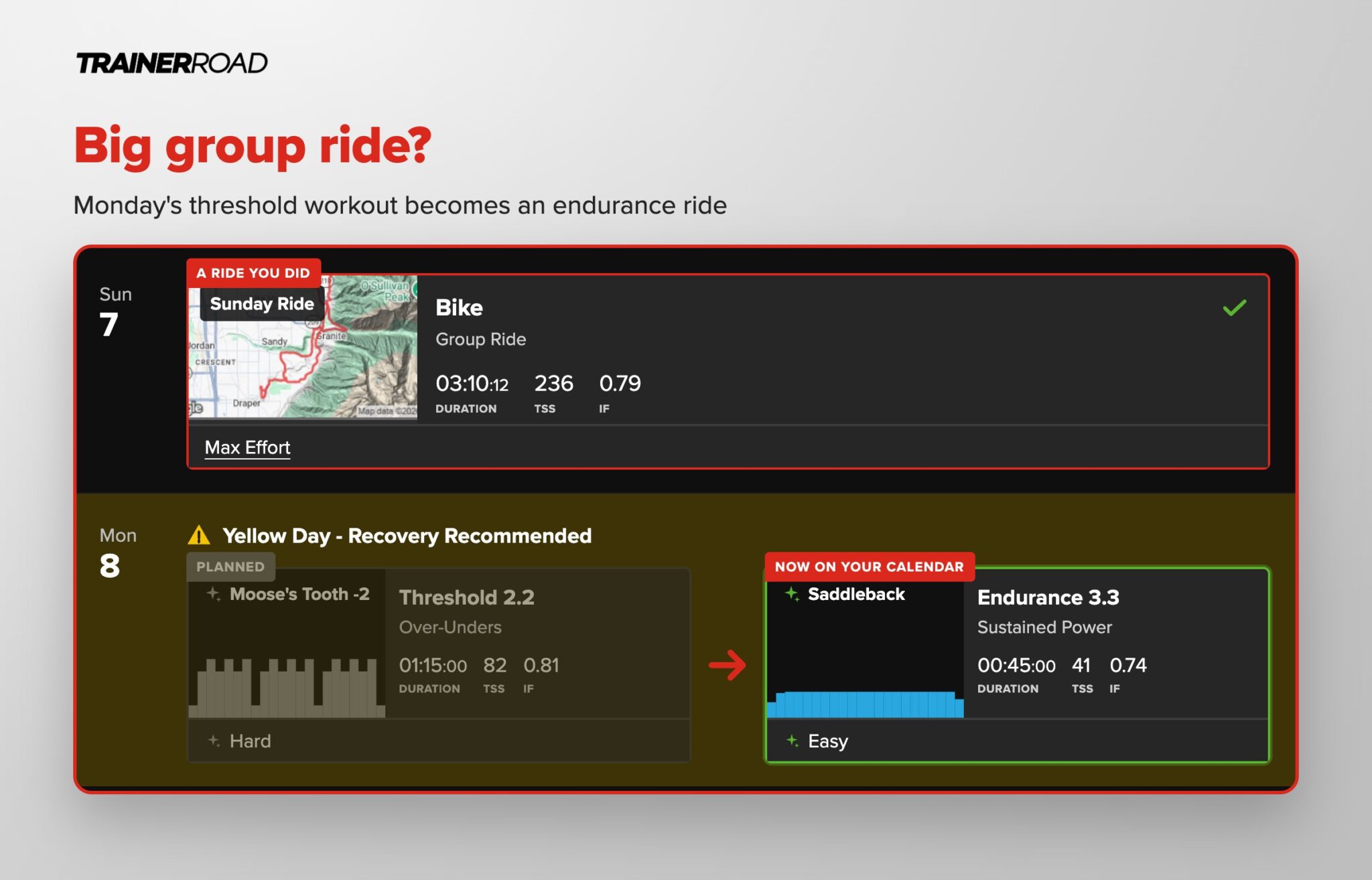
After a big group ride, TrainerRoad usually makes the next hard workout easier. Say you had a threshold workout planned for Monday and Sunday’s group ride turned into three hours you rated Max Effort. When that ride syncs to your calendar, TrainerRoad re-simulates the next four weeks, counts the load you just added, and swaps Monday’s intervals for an endurance ride. On your calendar, Monday will likely be swapped with an easy endurance day or a rest day.
You still get the fitness from the group ride. TrainerRoad just does not ask for a hard workout the day after you already did one. The plan keeps building toward your goal, and the rest of the week still fits.
What Happens When You Miss a Workout?
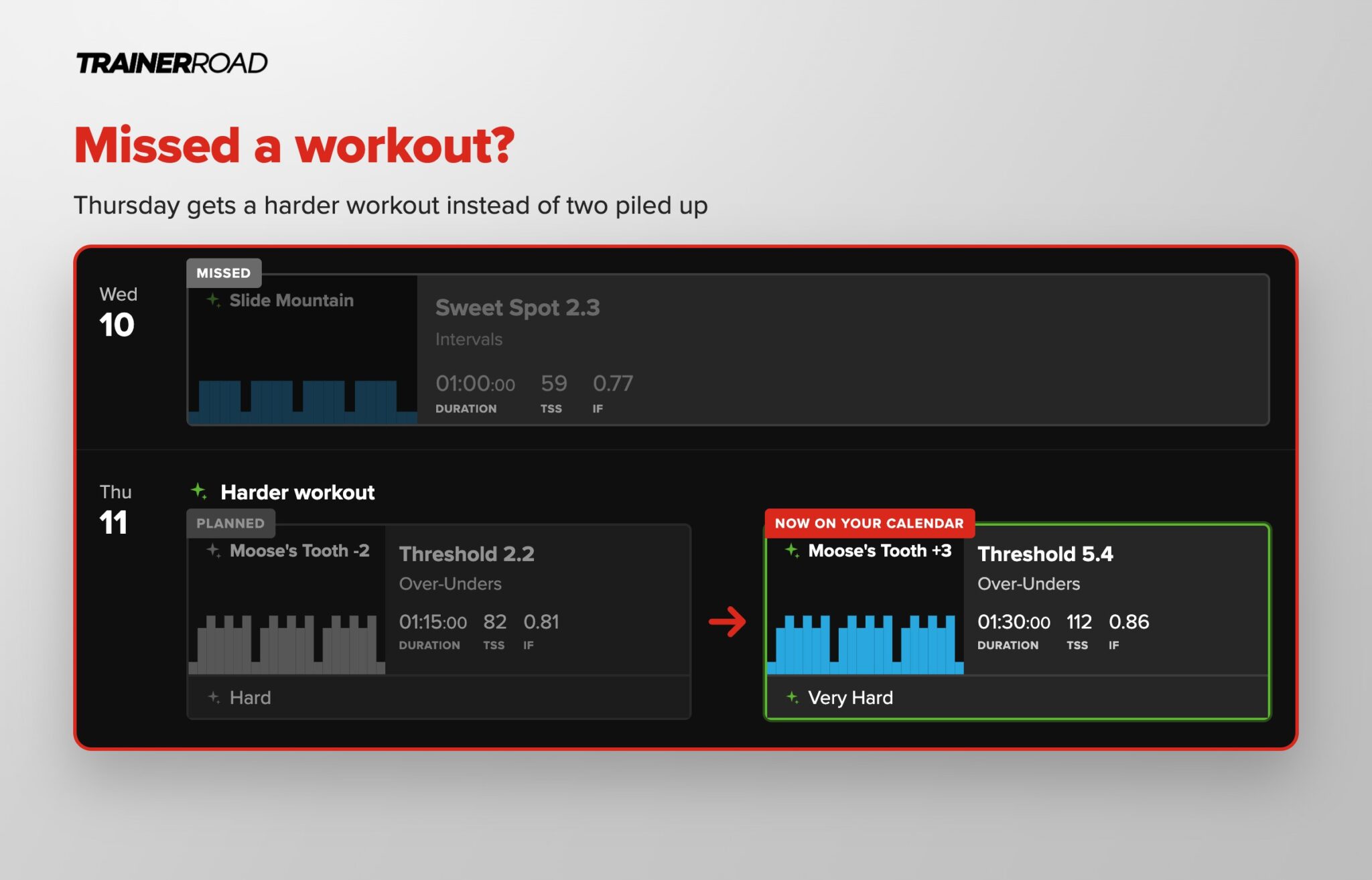
When you miss a workout, TrainerRoad re-simulates your plan from where you actually are, and nothing piles up on the next day. A missed workout stays on your calendar greyed out, and the next workout is picked fresh. If missing Wednesday means you are fresher than TrainerRoad expected on Thursday, Thursday’s workout can get harder to make use of that. If you missed it because you were wrecked, TrainerRoad has probably already noticed from trends in your power, heart rate, and training stress. Your last post-workout survey adds to that, and Thursday eases off instead.
TrainerRoad will not stack the missed workout on top of the next one. Catching up on a missed day usually costs you the rest of the week. This works the same for a missed week as for a missed day, and the post on how TrainerRoad plans adapt to interruptions and time off covers the longer breaks. You come back to a plan that starts from today.
What Happens When You Add an Unplanned Ride?
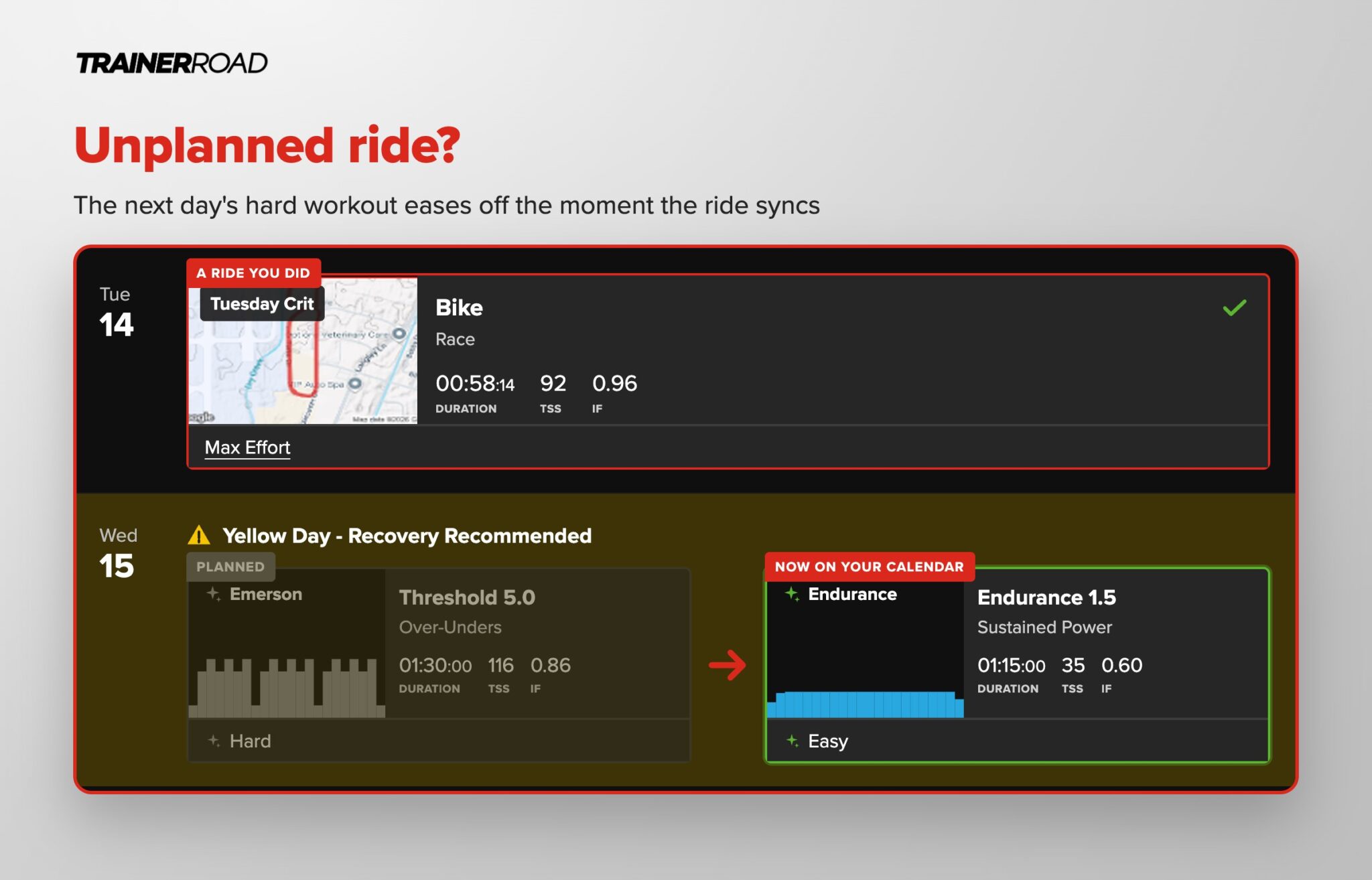
When you add an unplanned ride, TrainerRoad updates your future workouts the moment the ride lands on your calendar. None of them need to be planned ahead, whether it is a Tuesday crit you entered on a whim, a long ride with a friend who was in town, or a Zwift race on a Friday night. Ride it, let it sync, and the workouts after it adjust to account for what you did.
Rides count from wherever you did them. Workouts in the TrainerRoad app, outside rides from your head unit, and rides on Zwift or Rouvy all sync to the same calendar and all feed the same re-simulation. If the unplanned ride was hard, the next hard day usually gets easier. If it was an easy spin, you will not see much move. Either way, the plan has already accounted for it by the time you open the app.
What Happens When Fatigue Builds Up?
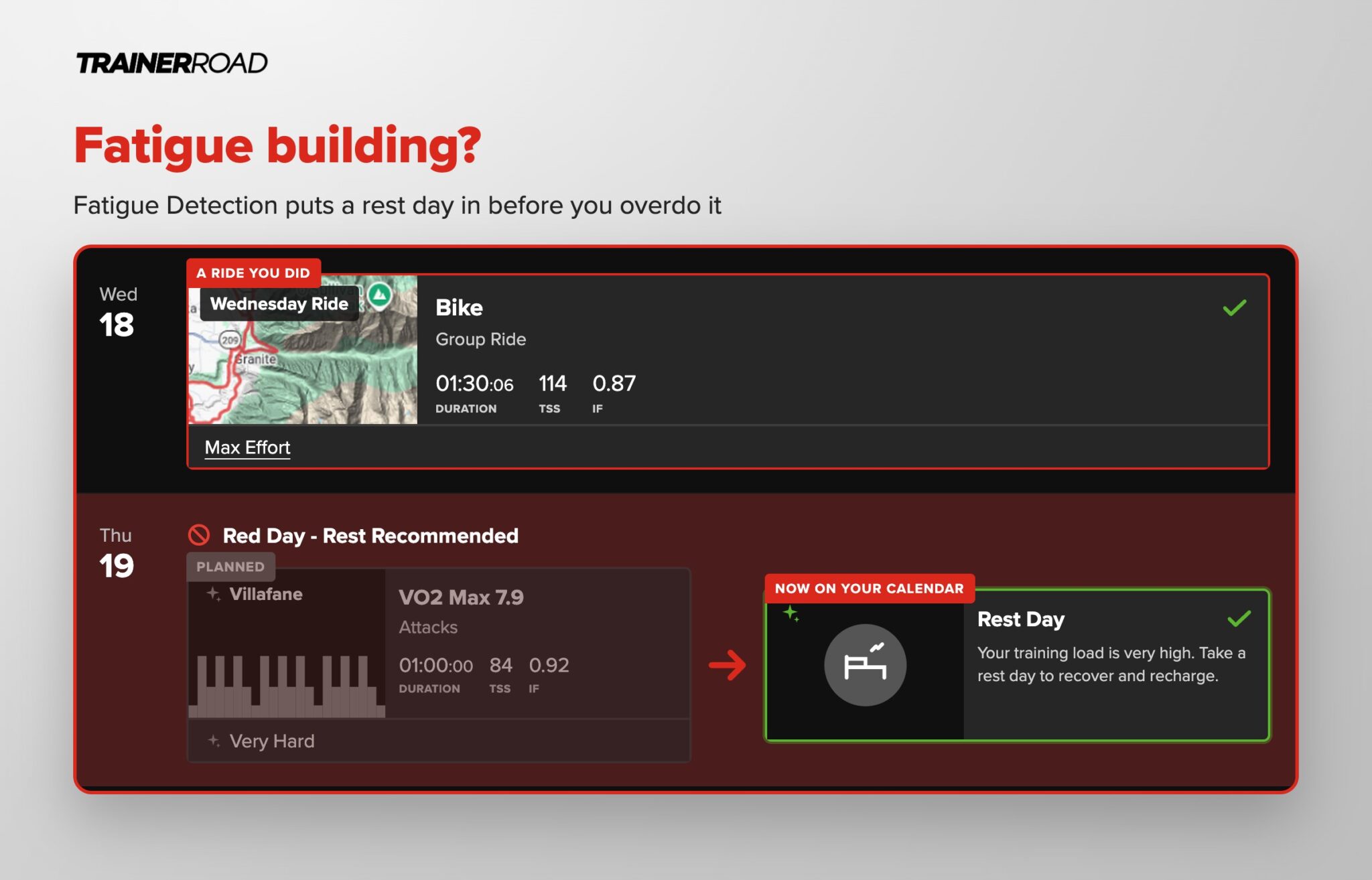
When fatigue builds up, TrainerRoad spots it early and puts a rest day or an easy day in before you overdo it. That is Fatigue Detection, the part of TrainerRoad that monitors your training to help prevent long-term fatigue and unproductive workouts. It watches your training load, your recent rides, and how you have been rating your workouts, and it does not wait for you to notice your legs are gone. It predicts fatigue and changes the days ahead of it.
That change shows up on your calendar as a Yellow Day or a Red Day. A Yellow Day means recovery is recommended, and TrainerRoad swaps the planned workout for an endurance ride. A Red Day means rest is recommended, and the workout becomes a rest day. In both cases the swap is already done when you look. A group ride or a solo ride planned on one of those days adapts too. A hard ride becomes an easy ride, and on a Red Day TrainerRoad recommends rest instead of the ride. The Fatigue Detection post covers what it looks at and why an easy day now protects the hard days later.
What Do You Have to Do?
You ride and answer one question about how it felt, and that is all TrainerRoad needs. The post-workout survey takes a few seconds and tells TrainerRoad something your power file cannot, which is whether the ride felt as hard as expected. Rate a ride Very Hard or Max Effort and the days after it account for that.
The plan is also yours to change. Open any workout and pick an alternate that is shorter, longer, easier, or harder, and TrainerRoad re-simulates the days after it. Move a workout to a different day and the same thing happens. The plan adjusts automatically, and it also adjusts to whatever you decide to do with it.
Is This the Same as Having a Coach?
This is the part of coaching that a plan on paper cannot do. A good coach does not hand you twelve weeks and disappear. They look at what you did this week and change next week. TrainerRoad does that after every ride, for every athlete, without you writing an email to explain the group ride ran long.
It also removes the two costs that usually come with getting a plan changed. With a coach, every change means reaching out, waiting for an answer, and in most cases paying for their time, either in a monthly fee or per revision. With a plan you bought off the shelf, changes are often an extra charge, or not available at all, so you end up guessing and editing it yourself. With TrainerRoad the changes are part of the subscription and happen on their own. No need to pay when your week goes sideways. It takes care of it for you.
What makes that possible is TrainerRoad AI. TrainerRoad trains its own models on millions of rides from real athletes, from beginners to WorldTour pros, to learn what makes cyclists faster in every scenario. It pairs that with your own training history to learn how you respond, then runs simulations across every workout it could give you and picks the one with the best predicted outcome. Set your goal and your schedule in Plan Builder, and the adjusting is handled from there.
But let’s say you do have a question and need to talk to somebody. TrainerRoad has a trained support team of real humans, many of them cyclists like you, ready to answer your questions and help. They are available by live chat in the app and on the website, by email at support@trainerroad.com, and you can even schedule a call with them for coaching questions.
Frequently Asked Questions
Does TrainerRoad adjust your training plan automatically?
Yes. When you save a ride, or anything on your calendar changes, TrainerRoad re-simulates the next four weeks of your plan from where you actually are and puts the right workout on each day. It happens in the background. The only thing you fill in is the one-question post-workout survey after each ride.
Is a TrainerRoad plan a template?
No. Plan Builder sets the shape of the plan, meaning the phases and how long each one lasts, based on your goal and your schedule. The workout on each day is picked fresh by TrainerRoad AI from simulations on your own rides, so two athletes on the same plan get different workouts, and your own workouts change as your fitness changes.
What happens if I skip a workout on TrainerRoad?
TrainerRoad re-simulates your plan from where you are and picks the next workout fresh. It does not stack the missed workout onto the next day. If skipping means you are fresher than expected, the next workout can get harder. If you skipped because you were worn down, TrainerRoad has usually already seen that in your power, heart rate, and training stress, and your last post-workout survey confirms it, so the next workout eases off.
Does TrainerRoad count outside rides and Zwift rides?
Yes. Outside rides from your head unit, Zwift and Rouvy rides, and workouts in the TrainerRoad app all sync to the same calendar, and all of them feed the re-simulation. A hard unplanned ride changes the workouts that follow it the same way a planned workout would.
Why did TrainerRoad make my next workout easier?
Because the load from your recent rides, or how you rated them, told TrainerRoad that a hard workout on that day would not be productive. After a big group ride or a hard unplanned ride, TrainerRoad usually swaps the next hard workout for an endurance ride or a rest day so you recover and keep the plan on track. You do not have to tell it you are tired. Fatigue Detection often flags fatigue before you notice it, and the post-workout survey is the one thing that helps it most.
What is a Yellow Day on TrainerRoad?
A Yellow Day is a day where TrainerRoad recommends recovery. Fatigue Detection flags it when your recent training load or your post-workout survey answers suggest a hard workout would not be productive, and the planned workout is swapped for an endurance ride. A Red Day goes one step further and recommends rest.
Can I override what TrainerRoad changed?
Yes. Open the workout and pick an alternate that is shorter, longer, easier, or harder, or move it to another day, and TrainerRoad re-simulates the days after it. The plan adjusts to you automatically, and it adjusts again to whatever you decide to change.
Is TrainerRoad an online cycling coach?
TrainerRoad is an online cycling training tool that does the planning and adjusting part of coaching automatically. You set your goal and your schedule, TrainerRoad picks each workout, and after every ride it re-simulates the next four weeks so the plan always starts from where you are. There is no coach you have to message to get the plan changed and no extra charge when it changes. If you do have a question, TrainerRoad’s support team is available by live chat, email, or a scheduled call.
Plans usually fall apart when they stop matching your life and fixing them by hand gets old. TrainerRoad takes that job off your plate. You ride, you save, and the plan keeps up.
TrainerRoad finds the right workout for every ride and adjusts to you in real time. Try it risk-free for 30 days.
Start Getting FasterRelated reading
- See 4 Weeks Ahead: Training With TrainerRoad AI’s New Training Simulation
- How Does TrainerRoad Pick Your Workouts?
- Recover Right, Get Faster: Updated Fatigue Detection With TrainerRoad AI
- Training Hard Without Progress? There’s a Smarter Way to Get Faster
- How TrainerRoad Builds Custom Training Plans for You
- How to Get Started With TrainerRoad
- TrainerRoad: A Beginner’s Guide to Smarter Cycling Training