If you turned down the intensity, that usually triggers a why didn’t you complete the workout. Definitely an “all out” effort if you do.
Thanks for the links. I had read up on some of how the Ai program works but was still a bit fuzzy. I understand how the black boxes work, but the black boxes won’t go away even after deleting the workout as described by TR. I just gave up trying to remove them and letting Ai do it’s thing for 1 month and see how it works for me. It seems to be working for me so far. Again, thanks…
1 Like
I lost about the same FTP also because I had not been on the bike for awhile. It’s not a whole lot, but I feel it. So, to keep me from getting discarriage with my training, because I knew where my fitness level used to be, I decided to put my pride aside and let Ai guide me back to my power, strength and endurance levels. I will (gulp) submit to the Ai program, trust it, and let it get me back to my fitness level. It’s hard because I knew where I was with my fitness and have lost 2-3 steps.
Basically what I am saying, let Ai do it’s work and just work your way back.
1 Like
Why not post a screenshot of what you’re referring to…?
I’ve assumed that by the “black box” you mean the large 28-day-long dark shaded area of your Calendar. This is the new “Simulation Window”, and at present this cannot be removed from the Calendar display. AI Workouts that fall within that window get adapted by the AI into specific workouts, based on your past performance, fatigue levels and RPE responses. There’s no problem with that being displayed, unless you’ve a real aversion to a big dark area on screen, and it’s a fundamental part of this TR AI release. It sounds like TR may add an option to disable this display for the small number of users who opt out of pretty much all of the new AI stuff, but that’ll likely only be relevant to a few people.
Answering this one directly, the model behind TrainerRoad AI does not know what your FTP is. We have built a tool that works backward from the model’s analysis of your raw watts to find what the best training benchmark is for you to get the performance improvement you need. This allows us to view performance objectively and do a better job of meeting athletes where they are at rather than being stuck with viewing things through the lens of FTP.
In your specific case, it looks like some odd stuff happened though. Here’s the walkthrough:
-
After completing some seriously hard VO2 Max and Threshold workouts that you rated Hard around the turn of the year, the new version of AI FTP Detection gave you a value of 290 on Jan 20.
-
On Jan. 22 you did a VO2max workout that FTP that was 54% likely to be Hard and 43% likely to be Very Hard. You turned down the intensity and rated it Very Hard, then manually changed your FTP down to 275 after the workout.
-
At that manually set FTP of 275, you did some endurance workouts and a manually selected Sweet Spot workout, and then your first high intensity workout prescribed by TR AI came on Feb 3. It was predicted to be Very Hard, and you rated it Very Hard.
-
Your first TR AI Threshold workout at your manually set FTP of 275 happened on Feb 6. It was 3x18 Hard Starts with the Threshold intervals at 264w. You turned down the intensity and marked it as a Maximum Effort due to intensity. The confusing part here is that if we look at the delta between the prescribed power this workout would have had you doing vs. what you’ve done recently, it was 20w lower for 18min and that gap grew close to 30w when you look at longer durations for the rest of the workout. At your manually selected FTP of 275, this workout should have been doable and either Very Hard or Hard, based on the power you had been doing over the last 6 weeks.
-
Now, this next part is CRUCIAL to understand and where the weird stuff comes in. If I look at the admin tool for AI FTP Detection for Feb 7 (the day you failed that Threshold workout in point 4 above), it puts your FTP at 283. While it had you at 290 back on Jan 20, a reduction in volume and struggling with that Threshold workout was a clear sign that your FTP should be adjusted, BUT, through a unanticipated UX pathway, you went back to your career and turned on AI FTP Prediction again, which granted you that original FTP Detection you got on Jan 20 which was too high by this point. I’m going to flag this to the team as a pathway we need to fix.
-
With that high FTP of 290 in mind, TrainerRoad AI gave you a significantly easier VO2 Max workout on Feb 10 than what you had been doing in the weeks prior, but you can still see that in terms of Normalized Power, the prescribed power for the sets was still 56w lower than than what you had done in the previous six weeks. You turned down the intensity and marked it as a Max Effort. You turned down the next day’s VO2 Max workout as well, all pointing to your FTP likely being too high right now


So the takeaways:
- That weird pathway allowed too high of an FTP right now. You can manually adjust to 283 right now and you’ll get better training.
- I’d not suggest doing what you currently are this week with Tue: VO2 Max, Wed: VO2 Max, Thur: Threshold. Your plan’s schedule allows 1 day of rest between each of those, and that will lead to much better results

5 Likes
Wow, thank you for this analysis Jonathan. Good to hear the situation will eventually get the product better.
I want to add two things:
-
Yesterday I had a TrainerRoad training scheduled of 14x 50 seconds 344W intervals. This was also indicated like that on the synced workout in the Zwift Companion app. However when I started the workout and was in Watopia I noticed the intervals were bumped to 368W.
When I now go the TR workout “Thimble” I also see the 368W requested which is 127% of the 290W FTP. The change in FTP to 290W seemed to not have refreshed throughout all the applications. Might also be due to the unanticipated UX pathway you are indicating.
This is a minor issue as eventually the workout proposed in Zwift contained the correct numbers according to the configured FTP. -
I also indicated this in another topic. During rides outdoor I’m -for some reason- able to push a substantial more amount of power. The “Power Records” NP chart is clear proof of this. The chart links my best performances all to outdoor rides which I have also rated as “Easy”. The numbers indoor vs the numbers outdoor just don’t make sense because the workouts feel so different in intensity and registered power outputs.
It would be nice to have an option to enter a manual offset parameter to compensate for this difference. Or… any other recommendation is very welcome.
Three days in a row hard workouts is indeed not ideal and for sure I listen to my legs before taking them on. This week unfortunately I have only Tuesday, Wednesday and Thursday available for workouts. Monday was not an option due to lack of sleep because of the SuperBowl and Friday I have a night out with the misses. Saturday also not an option in order to be fresh to cycle with the cycling team on Sunday :-). It’s how life goes.
Keep it up!
1 Like
Yes, I am referring to the 28 day boxes. I was able to remove them before (just a few days ago) when I generated a custom plan but wanted to change it and go with the older style base training plans, but now those black boxes won’t go away. Also, when I placed one of the older base training plans (i.e. none Ai plan) on the calendar with those black boxes (remember I deleted the Ai plan but boxes remained) the workouts were changed inside the black boxes, however, that same training plan when placed on the calendar with no black boxes did not change and remained the same. The black boxes can be remove per TR instructions, but for some reason, I can’t remove them on my calendar. I think there’s a glitch and curious because there may be times when I don’t want to use Ai. I’ve contacted TR on this and waiting to hear from them. For the time being, I am using the Ai plan.
Got it. This looks like a sync issue with Zwift. Usually a bit of time solves those, just like you saw.
Our model analyzes all of your training and is likely able to pick up on this difference. If you get a workout that feels too hard after riding outside for a while, your survey and power/HR data would reflect this and it would react quickly. We chose to handle these differences in this way rather than manual offsets because this relationship between indoor and outdoor power isn’t fixed, even for the same individual.
I feel you on doing what you can with your schedule! In a future scenario like this, I’d recommend just doing 2 days instead of 3. For years I was always tempted to cram in the key workouts into a week at all costs, but I’ve learned this is not the best path forward.
2 Likes
You are mistaken here, and it’d be useful for you to grasp some of the new terminology….
The Simulation Window cannot currently be disabled (hidden from view on the Calendar), as you believe you did; it is always present for the 28 days commencing today. NB there may be an option introduced in the future to hide the sim window, I seem to recall being mentioned by TR in the past few weeks, but not currently…
Any AI Workouts showing within the simulation window will be adapted by the AI into specific workouts, continuously up until the point the workout is either completed or moves into the past and therefore falls outside the simulation window.
If you placed a plan onto the Calendar and there we no “black boxes” present, that’s simply because you were looking at a part of the Calendar and the plan happened to lie outside of the 28 day simulation window…
Outside of the simulation window, AI Workouts are always displayed as Placeholders, which represent a certain category of workout rather than a specific workout, and are not adapted into specific workouts until time marches forward and these workouts eventually move into the 28-day simulation window.
There is no glitch!
1 Like
Glad to hear Support is helping you out!
I’m looking at your calendar now and this is what I’m seeing:
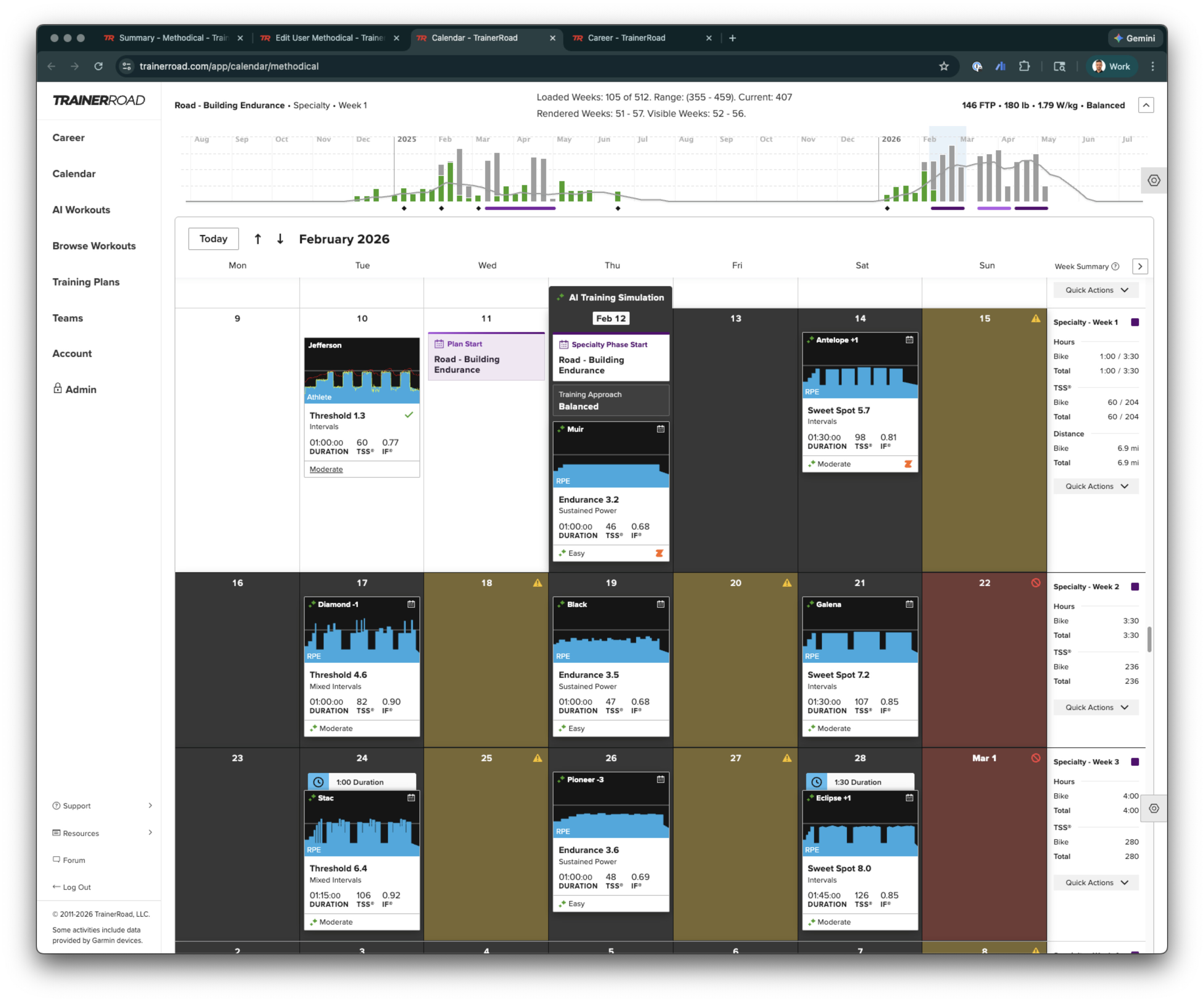
You currently have an AI-driven training plan on your calendar. It’s built by Plan Builder, and the goal is to build endurance for road riding.
I think the black boxes you are mentioning are the workouts that are a part of your training plan. After a change happens to your training plan, you’ll see TrainerRoad AI run simulations for every scheduled workout in the next 4 weeks to make sure it is giving you appropriately difficult workouts.
What this looks like is an green sparkle animation on each of your scheduled workouts as TrainerRoad AI runs those simulations. This process is what allows TrainerRoad AI to give you better training.
If you go with a static training plan, there’s no guarantee your workouts will be appropriately difficult for you, so I wouldn’t suggest taking that approach.
As of now it looks like it is quickly locking in on your abilities, so you should get great training with this plan!

I get what you are saying about not specifying a specific workout until close to the workout day (i.e. place holder) and being based on my previous workouts…Ai doing is predictability thing. I got that. I did some reading on it. What I am saying is when I place one of the old style workout inside the black boxes it changed the “type” of training (i.e. one sweet spot day to an endurance day as an example). All I can assume is that no matter what I do or place inside those black boxes, the system will continue to see the prior custom workout that initially created those black boxes and make changes to match what was once there. Am I correct or not? That is what it sounds like you are saying (i.e. workout simulation doesn’t change or can’t be hidden and is always there no matter what).
All I can say is do a test. Create a custom plan, delete it and place an old style training both inside the black boxes and outside the black boxes on the calendar and see what I am referring too.
Question. Once the black boxes are created they can never be removed, is this what you are telling me? Also, how do you upload a picture of the calendar?
Thanks…Al
I reinstalled the custom plan that I initially created and deleted inside the boxes and decided to stick with the Ai workouts to see what it does for me. I agree that it seems to be working for me, so I am I am going forward with it.
Question. Once the black boxes are created, via custom plan, they can never be removed from the calendar, is this true?
Thanks…Al
Hi
First time poster. AI FTP just bumped my FTP up 27 watts to 427. I have been nailing 3 weeks of workouts but feels a bit much and happy to take it.
However, I thought the AI disconnected from this and progressively overloaded efforts? My upcoming VO2 workout on 27 Feb has massive bump in effort, 27 watts increase in a 5 min effort. Is that a normal effort jump in a 5 min effort to do?
Cheers

