Coming Soon: Endurance Built For Real Gains đź’Ş

​​Coming Soon: Endurance Built For Real Gains :flexed_biceps:
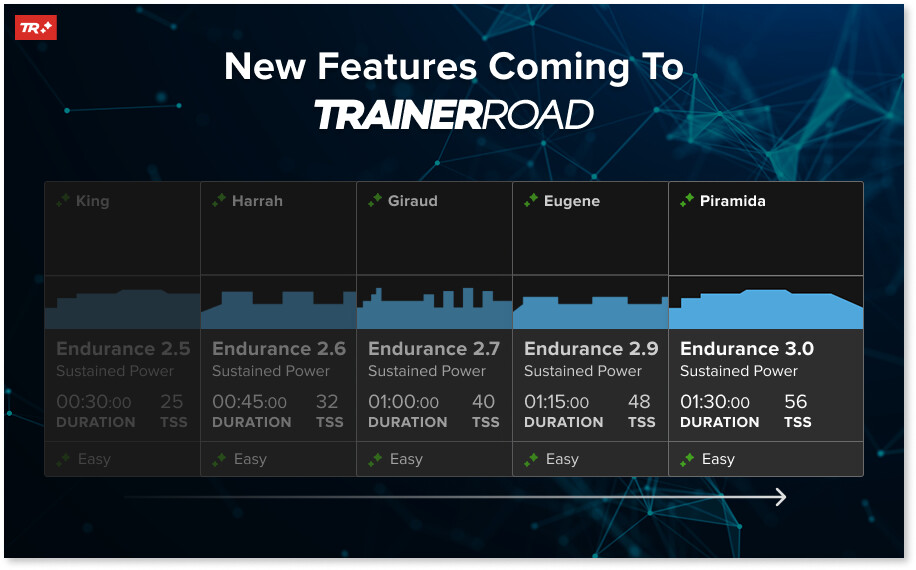
Get The Long Weekend Rides You Want While Avoiding Fatigue

Big endurance days can deliver major fitness gains, but only when they’re done right. Even at low intensity, long rides place significant strain on your body, and if duration isn’t managed carefully, those rides can leave you more fatigued than fit.

That’s why getting their duration right is key to improving fitness!

TrainerRoad’s AI Dynamic Endurance gradually increases your long weekend rides to build meaningful endurance without compromising recovery or the quality of your other workouts. Instead of locking endurance rides to a fixed duration, TrainerRoad AI progresses them in a way that supports consistent improvement and sustainable training.

TrainerRoad’s AI will also automatically adjust the length of your other scheduled workouts to help you avoid plateaus and burnout, based on your fitness and fatigue.

You choose how long you want to train each day, and when TrainerRoad AI determines that more or less volume would be more effective, it updates your workout duration for you with a one-tap option to restore the original length.


How Dynamic Endurance Works for You

:bar_chart: Progressive Endurance

Long weekend rides increase gradually over time, building endurance step by step instead of staying locked to a static duration that may no longer be effective.

:bullseye: Goal-Aligned Duration

Long weekend rides trend toward your event duration or your chosen maximum length in a way that’s sustainable, recoverable, without overloading.

:stopwatch: Automatic Adjustments

Your other scheduled workout length adjusts up or down to find the most productive option.


What Athletes Are Saying

We’ve been testing it with real athletes and their feedback has been amazing.

— — —

“The improvements I’ve seen in performance and consistency during this beta period have only reinforced my trust in the system. I’m genuinely excited for where this will take my fitness over the next few months.” — Beta Tester :technologist:

— — —

There’s so much more to it, including the ability to predict your FTP in the future and a feature that predicts fatigue long before it happens, so stay tuned as we share more details leading up to launch day, and sign up now at TrainerRoad.com to be ready to use TrainerRoad AI as soon as it launches.

Sign Up & Get TrainerRoad AI on Launch

25 Likes

Finally some volume progression! That’s going to make a lot of people happy.

So when going through plan builder would you set a maximum duration for weekend rides and the AI will work you up to that?

14 Likes

So when is it finally coming? Too much talking, better showing some of this.

3 Likes

On the fifth day of Christmas TrainerRoad gave to me …
Five lo-ong rides,
Fore cast FTP,
Three training knobs,
Two window sims,
And an AI that’s not ChatGPT!

38 Likes

This is great! A lot of people train for very long events and TR would historically never want to give you longer rides unless you manually went and adjusted the time.

Can we expect this update to challenge your chosen maximum if your event might dictate longer rides? EG. Training for a 200 mile race but I have my longest ride set at 2 hours, surely it would be helpful to get some 5+ hour rides in - will it suggest this?

3 Likes

I didn’t know you could schedule outside long rides with a training plan. Will this just show up eventually as something I can do indoors or outdoors?

do folks really need fancy tech to do something as simple as adding 30min to your longer ride over time and within blocks?

3 Likes

This might be aligned to a question I was aiming to ask - so if not related, please bear with me…

Background - I am on the last days of a short plan to see out my working year, then on some leave and want to start training for my A race after the break. (My A race being an endurance MTB event. With a B race and some running events scattered in.)

How is one meant to set up your A race correctly for a training plan? At this stage I can enter intensity , time and type of race. No terrain, distance or elevation associated with the time aspect.

So how is the training being influenced when you enter what you can enter - and what should you set it to?
DURATION: Is time your “if all the stars align”-style goal time or an expected duration in which you’ve done the race in before? (And I’m aware condition can play a MAJOR part in said star alignment.)

INTENSITY: Should I put it at 7 because it’s a long MTB race, and you’re not going to go as close to full gas like with a 100k road race. But you are going to go as fast as you can. So does this mean I have to enter “Race pace” - even though race pace will naturally be a lower intensity, and I’m not aiming to win the thing, just improve my own time?

TYPE: There is zero single track involved, but usually some quite hairy sections. I prefer to do it with MTB, yet have done it on gravel bike - and am leaning towards labelling as “gravel”. Just double checked, there is no other matching option, except maybe Cross Country Marathon.

Maybe I’m most confused by implications of bringing the time down to “dream goal time” vs the increased intensity level that that would require - but all you have to play with is duration and effort level.

This is already an option in setting up your plan to schedule a weekly outside long ride. It is just very static, to so have to manually tweak it to align with your plans for the day, and then try to stick to the power values. And it will be taken into consideration for impact on future workouts. But it does not contribute to PL.

You can also swap out e.g. 2h endurance indoor session with an outside ride (and specify group ride or solo ride)

Need no, but you also don’t need TR at all based on that logic. But here we are on the TR forum using their product.

This is just a step in people being annoyed that TR doesn’t seem to add volume over time, usually after they told it they had 6 hours but want to train 15 hours for a 24 hours race. It is removing that load from someone having to figure out if they should add more time on an endurance ride. It is just another tool helping an athlete make the right decisions. I don’t see how there could be a single negative thing to say simply because a feature exists.

13 Likes

Again, will your “upgrade” me optional or mandatory when I renew my annual subscription?

Dynamic volume adjustment is something I am really excited about. Having my Z2 rides increase in duration as I approach an event is fantastic. Will we have to edit our existing plan or will the new features apply to what we already have going?

I already subscribed just to find out all those new features aren’t available at all! Last two weeks emails arenjust false advertising.

Yep, why use a calculator when an abacus is just as good :+1:

10 Likes

image

9 Likes

You chose to use it or not. If you build a plan you set max hours for endurance rides. If you select endurance rides piecemeal you can set the max time as well or you can opt to leave it fixed.

Sorry to make my question complex. I’ve had many difficulties maintaining TR software, internet connections and HR-Power device connections from my stationary bike and computer. I’d like to keep ONLY my current TR version and not UPGRADE. May I do this? No wrong answer please.

I’m pretty confident the change to TR AI will not impact your internet connection or HR-Power device connections.

6 Likes

Welp, this along with the other posts about the new features sounds great a basically what I’ve been hoping for; something that looks at all my riding, including my typical unstructured rides, and tells me what I should do in the near future workout AND riding wise. Hopefully it’s simple and just works. Looking forward to trying it.

3 Likes