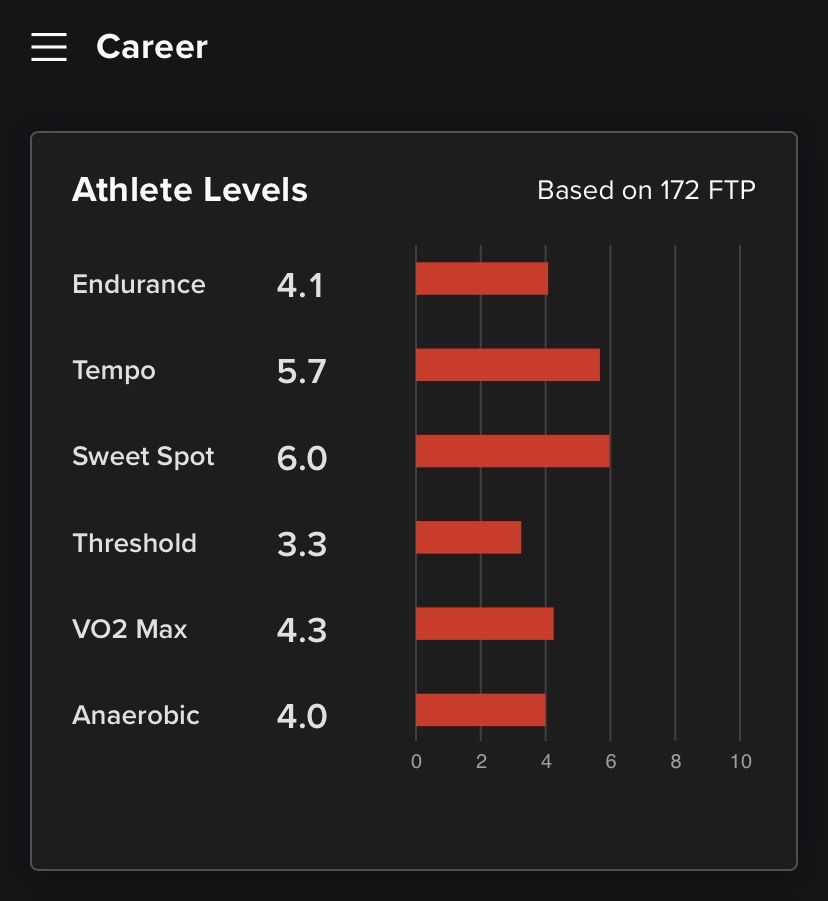
I rejected the AI FTP Detection because I’m not interested in using the new “TR FTP”. However, the update changed my “Athlete Levels” - I’m guessing to match the new FTP (that I didn’t accept).
In particular:
Sunday I completed Katahdin + 2 (VO2 Max 5.8)
Tuesday I completed Blue Gum (Threshold 5.6)
but since the update, TR says my “Athlete Levels” are
Threshold 3.3
VO2 Max 4.3
which doesn’t make sense when I’ve successfully completed harder workouts in the past week.
I took a look at your account and there is definitely something going on with your levels. I’m going to get this reported to an engineer and see if we can get it fixed.
I think that I’ve encountered pretty much the same error. My progression levels have been updated according to the new AI FTP prediction I haven’t accepted.
Seems like a bug? (It’s certainly a regression - I’m pretty certain they did before the AI update.) Also inconsistent with the graphic they sync to Strava
I’ve noticed something similar with my account. My levels from yesterday have dropped one session and one day before AI FTP is scheduled to be applied. My SS of 7.2 and VO2 Max of 7.1 (completed 3 days ago) are now showing 4.7 and 4.3 but AI FTP won’t update until tomorrow…I’d have thought that they should stay at the completed level until the day of the update?
Having read this thread, I thought I’d check my ALs - especially as I have an AIFTP Detection due tomorrow. They are lower (much lower in some areas) than they should be.
@TrainerRoad_Admin Can I get some help with this please? I want to do an FTP test soon, at which point this is going to be annoying. If my FTP changes then it’s really useful to see adjusted Athlete Levels so I can ballpark which workouts to target with my new FTP.
Even when they work the athlete levels displayed on your career page are only a high-watermark rough guide.
Even if you don’t use AI you would be better served by temporarily scheduling an AI workout of the type you plan to complete on your calender and making a note of what the workout level is.
But to be honest you may as well just do the workout that the AI picks.
But to be honest you may as well just do the workout that the AI picks.
Doing the workout that AI picks is a bad suggestion for me - I have specific needs, I’ve been coached before, I know more about my specific body and performance than the AI does. (I’m sure the AI is very useful for many users! I’m just not in this bucket.)
Anyway, I don’t even think it’s possible for me to turn on the AI right now - where am I supposed to click to turn it on?
That workout on the right that says today’s AI pick is showing that the AI is already on. You would launch that workout to use it. If you link or screenshot your calendar we probably would get a better idea of what’s going on.
Looking at your athlete levels you are likely due for a large FTP increase if you used the aiFTP. Probably still due a large one even if you did an FTP test
No need to help me find workouts - probably easiest for me to just workaround it on my own. Just wanted to explain how Athlete Levels being broken disrupted my old workflow (thereby making the app less useful to me than it was before the update).
One thing I’m curious about is that I can’t see how to turn on AI FTP detection even if I wanted to - is that a bug or am I just missing something? (Oh nevermind, looks like it’s available today, but you can see from the screenshot above that it wasn’t available yesterday.)
If you look more carefully, you’ll see that my most recent workout was an FTP test. So I’m very confident that I’m not due any FTP increase.
Fwiw I don’t see how sharing my calendar would help with what I’m asking about here… feels like that would be derailing the thread even further. My intent here was just to flag a bug with Athlete Levels, and it sounds like this bug is now being addressed, so I’m happy.