I guess I am not as clear as you on the “why” part of this statement. Can you expand on your thoughts here?
I generally don’t see TR as a company that chooses the “complicated approach” without some reason decent, if they do it at all.
From what they reported on the podcast during release, the connection to the Ramp Test was the easiest way that they could implement the tool at that time. Presumably it was a lower effort and less complex option than changing the programming in the various app platforms (Android, Mobile iOs, Win, Mac), but that is my guess based upon what they shared and implied.
Well, I am assuming that TR team dont mind users checking their FTP whenever they want using AI approach, as long as the 14 days rule is working, just based on the fact that this feature is now always available via Ramp test windows in the calendar.
So, from users perspective (it could be just my opinion, but I doubt it), going through calendar, searching for a Ramp test there, or even adding it to the calendar just to be able to access that button is a little bit complicated. Having an easily accessible button for this purpose would make sense I think, especially considering overall very clean and efficient TR interface. It is also as easy or even probably simpler to implement from the programming point of view than the current solution. Hence the question “Why”…
But based on the original message from Nate, its all probably temporary anyway. I was just curious if there is some hidden reasoning behind.
I think you’re right. I had a ramp test scheduled just before this latest update. I’d been planning to use the AI FTP detection, and since I recently started doing my workouts in the morning, I really wanted to know what my replacement workout would be before going to bed the day before. I didn’t have the option to use AI FTP detection until really late that day, maybe 9:00 pm? I assume/hope that next time around, it’ll be a snap to get my new FTP and adapted plan much earlier the day before the ramp test is scheduled.
Still feel AI FTP is working for me. I’ve had small reductions, in line with what I’d expect from a few weeks unstructured with a family holiday/ vacation (getting out on the bike but nothing too intense). AT has looked after the specifics of the loss of top end.
Looking forward to the next one, as like other’s, as an early morning workout person, I like to have an idea before I go to bed what I am getting up too.
@mcneese.chad@Lupusoff -
I’m pretty sure you’re both right. They made it so it didn’t have to be at the exact 48 hour window second, but they ALSO had some text about the AI now showing up on all ramp tests in the future, not just the 48 hour away one.
@Lupusoff - I agree that there has to be a cleaner and easier for the user way to implement this. I love the idea of a countdown clock. I had the same problem as mentioned above where the Ramp was a day or two away and I kept logging in to see how many more minutes until I could press the button to see what the replacement workout would be. Definitely a PITA and not optimal.
@mcneese.chad - a +1 for having access to a change log
I’m a bit confused… AI FTP is showing on my ramp test in a few weeks time which I’m happy to wait for… however I can press that button now… and who doesn’t love pressing a button?.
My last AI FTP was on the 17th July although there is an entry in my FTP history on the 20th.
The thing is my AI FTP/Ramp test isn’t due until the 23rd August and I’m on holiday/vacation for two weeks before that so haven’t got anything planned in my training calendar, although I will be doing a lot of cycling just none of it structured.
Given 14 days after the 20th is the 3rd August… can I press the AI FTP button early? as in before my holiday?
This week my ramp test was scheduled for Tuesday. I moved it to Monday so I could get access to see where my ftp was. Maybe I didn’t need to do it but I didn’t see an option to give me access to push the button until I moved the workout.
I have a ramp test scheduled in about 3 weeks. I pressed the AI FTP detection button and it suggested a lower FTP. I instantly felt deflated, like “What’s the point of these next 3 weeks?”
Then I decided it didn’t matter – TrainerRoad, YOU DON’T KNOW ME!!! I write my destiny.
The thing I don’t like about that button, is it needs to say something like, “don’t just push this because you’re curious, if you do, you will not be able to push it again for two weeks”. I misunderstood and thought the two week clock only started if you ACCEPTED the change.
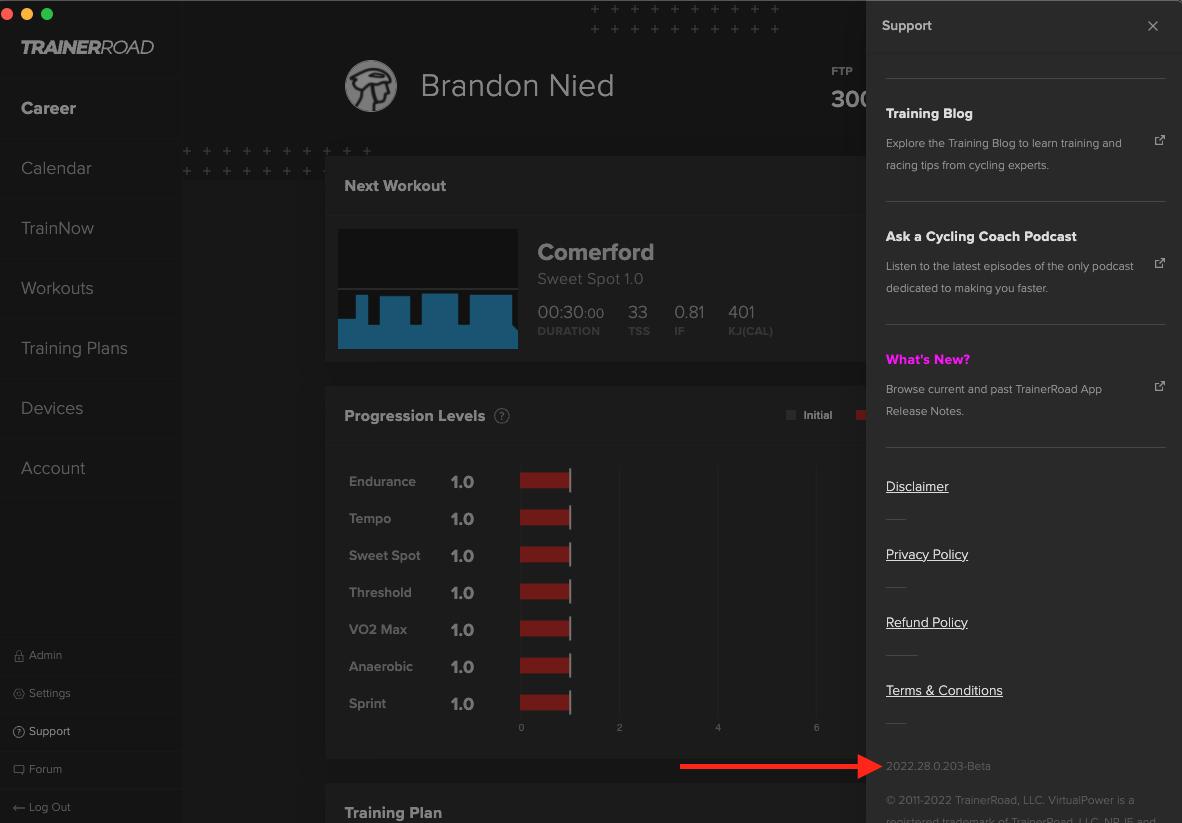
I went in and made an update to our release notes so they show when you first update in addition to when you click on a specific area in the desktop apps. I say area because it isn’t tied to a button yet (that will need to be a code change with an app release), but I wanted to test this out and give everyone the ability to do it now.
If you select the Support item in the NAV and then click on the version number the release notes should appear again for you to review. Again this is a temporary thing for desktop apps only at this time, but we’ll get a more permanent solution sorted for this soon on both desktop and mobile.
Give it a shot and let me know how it goes. I’ve personally tested on Mac beta and production apps, but not Windows yet.
I don’t get it…when we do a ride the plan is in most cases under ftp. How can you get an increase in ftp on any plan unless you are over and above your current ftp for over 20 mins. I already find that any plan I do when my ftp is set from TR as well as other platforms I struggle with the intensity. So the last thing I want is some AI telling me to up my ftp when I know that it should remain where it was
@Look242 this is the crux of machine learning. You don’t need to execute a scenario in order to know how your body will respond to it. The machine knows how your body will respond to it.
As you train you get stronger, more efficient, and able to better express FTP for longer. I’m almost any endurance sport you can increase your threshold by not doing threshold that’s how the body works. If you want to run a faster 5k you don’t have to jus let run all out 5ks. Just like I assume you don’t just do 3x20 threshold intervals or 20min FTP tests.
If you consistently struggle with intensity you should probably try and evaluate why that is as there is probably a non-FTP driven factor.
Just my 10cents aiFTP has always been conservative from what I’ve seen so I def don’t think it’s overreaching
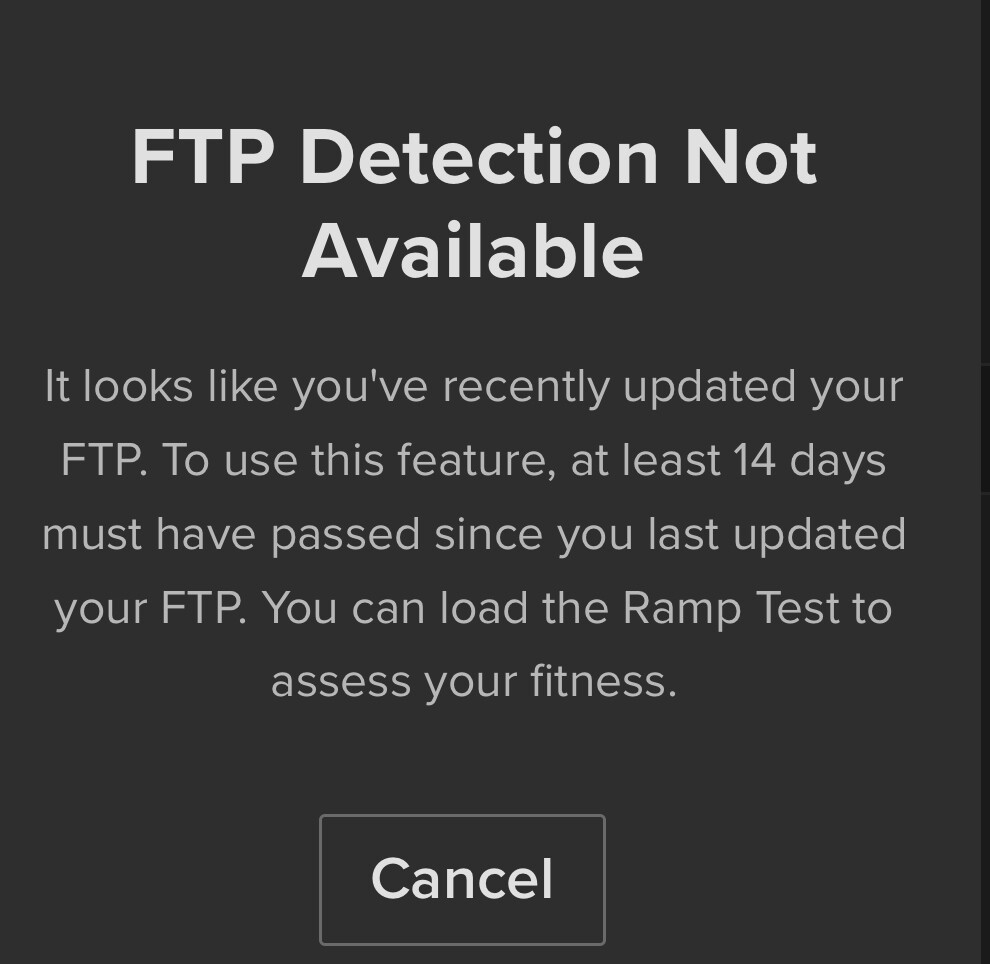
FTP detection has never been available for me and I think I just worked out why. I adjust my FTP on specific unstructured outdoor rides (different power source, yes will fix on next ramp test). And even though I’ve never adjusted it on a scheduled TR ride (through the trainer) and my FTP’s default remains the same as per last ramp test (3.5 weeks ago) I always get the same message.
It uses AI to estimate what your FTP would be based on the training you’ve done. Other models like what you’ve described (there’s a lot more than the 20 minute test - the ramp test, the 8 minute test, and dynamic estimates like Intervals.icu’s eFTP which can take various durations) all require capacitive efforts.
The AI FTP basically looks at your training history (all types of riding, Power+HR, HR only etc) and then the AI makes an estimate of what it thinks your FTP would be based on that training, based on the millions and millions of data points in TR’s database (which have been used to train the AI).
This is as designed - you can’t run AIFTP detection within 14 days of an FTP change. If you are doing unstructured outdoor workouts, why are you adjusting your FTP within TR?