did you get it working on your watch?
Haven’t tried either yet, but I was put off trying the garmin on my watch with all the lap pressing. Without having tested on the bolt, it seems cleaner, where you only pause if you want otherwise the workout runs through?
For what I‘ve gathered so far: Wahoo!
There’s a couple of reasons why TR can’t directly export workouts to head units, and has to do manual intervention on workouts to make them exportable. I have never used Wahoo head units (and thus created workouts for them), but I did a ton on Garmin, so I’ll base myself on that.
The first is the time structure. In TR, all intervals (in the wide sense, meaning all segments of a workout) use a single ending criteria: time. In Garmin workouts, there are three possible criteria: time, distance, and “open”, meaning lap button press. If you straight export any TR workout to Garmin, all intervals will be time-based, as they are inside; this is not so great because it does not give you the flexibility to get to a proper location to start repeats. Hence outside TR workouts use a mix of lap-button-press and pure time-based intervals, to make them easier to use on the road. That change can be partly automated, but still requires intervention.
The second is the presence in TR of “sloping” intervals, where the power demand ramps between two value over the duration of the interval. These are frequently used in TR (most cooldowns are done this way, for example). There is no such feature in Garmin. Export from TR to Garmin involves changing these sloping intervals into constant-level ones, either at the power level at the start, the end or the average of the interval. Again you need to know the context of the workout to decide how a sloping interval needs to be converted, if it’s possible at all.
So I don’t expect that at any point you will be able to simply press a button to send a custom workout to a head unit. This said - it is as easy, if not easier, to create a custom workout in Garmin Connect as in TR’s workout creator. You can simply create the workouts you need.
I believe TrainingPeaks is a ConnectIQ app; TrainerRoad’s using the Workout API.
TrainingPeaks exports a .fit file, which indeed allows a structured training to be transfered to a Garmin device (in addition to the ConnectIQ path mentioned by @danielm). I’m not familiar with the structured training workout programming in TP, I assume this has Garmin-compatible capabilities, such as defining the end of an interval either based on time, distance or lap button push? And does it do variable-target intervals?
Because of the reasons above. You need to convert some time-based intervals into lap-button presses, and get rid of variable-target intervals to move a TR workout to a Garmin device.
So last night I did a TR workout outside via the Wahoo - TR integration. It worked great but then there were bugs. I’m running the latest version of software on my wahoo elemnt, Quarq Dfour91 PM is updated to version 10 of the firmware, and my Wahoo HR chest strap has been working fine with a new battery. Mid way through the ride the Power froze, and I dropped both HR and Cadence. I stopped, repaired/recalibrated all units and started again. This solved the frozen power, dropped cadence, and HR. However, the workout did not start up again. I then hit “pause” “resume” and nothing happened. I rode a little further and it finally kicked back into gear. Now I’m not sure how the integration works with TR and Wahoo, but this was very weird. For a long time now I’ve used the TR and Trainingpeaks integration and it has worked great. In fact it’s the same screens on the wahoo elemnt. Just curious if anyone else has run into issues.
Thanks,
Sam
Perhaps the new firmware which introduced the outside workouts also introduced a bug .
I read elsewhere that GPS ‘off route’ alerts have become over-zealous since the update.
Update: I tried just about everything besides doing a hardware reset on the device…until I had no choice. I also deleted off the wahoo app, and the wahoo elemnt app. When I redownloaded the wahoo app and began to pair my Tickr HR strap to it, I was prompted to update the firmware on the HR strap. I then redownloaded the elemnt app, paired all of my sensors, but this time I also got the option to pair my Quarq DFour91 with Ant+ or BLE. I decided on Ant+ and paired my speed sensor, TickrHR, and Shimnao etubes. Reset up all of my screens and now it works just fine. So in conclusion I’m not sure if it was the new elemnt firmware update or that the TickrHR was running on old firmware that may not have been compatible with the elemnt. Something tells me it was a combination of both old and new firmware not playing well together, and the new firmware not accepting other sensors.
Tried an outside workout for the first time today. Was ok but think the workout I chose was not very well suited to being ridden outside; Crane +1 ( hard starts into sweetspot), found it hard aligning the power back down for the sweetspot portion straight off the back of the hard start.
Sorry if it’s been covered already (bit of a vast thread): One thing I wondered, is there a way to go back an interval? Accidentally hit the lap button during my warmup so had to improvise a little.
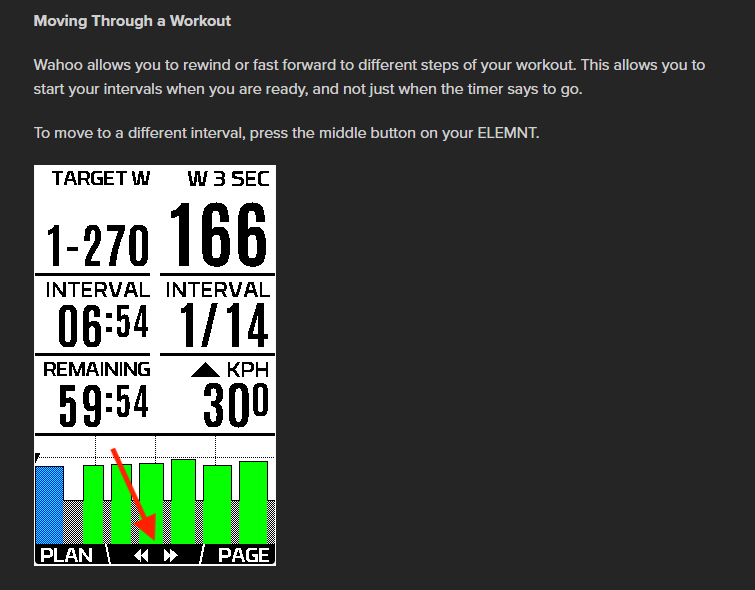
Ah ok, I’m on Garmin (520), sorry should have said in my post.
Far from conclusive, but my research on the Garmin support site and this comment in the main Garmin thread lead me to think there is not a way to go back with G-units.
I’m not sure if this is right place to flag possible bugs on the outdoor workouts - but today, running Mt. Field, the first interval just said 0-231W, and then the 2nd interval went right into the first of the 3 main SS blocks. It was missing the warm-up steps and rest block prior to the first 12 min SS block. Is this by design? I’ve only used a couple so far as I was sick for a few days, but the couple I tried I recalled being better matched to the original indoor ones.
This is on Wahoo BOLT updated w/latest firmware.
most of the outdoor warmups omit whatever gradual steps or spikes there are in the indoor versions. It seems like they are assuming the warmup will be more self-guided as the rider makes their way to wherever they’re going to do the main set.
thanks for the tip !
You are welcome and as much as I like the workout graph screen this is my main and i flip to the workout screen as a reminder what is up next.
Anybody had any issues with speed outside ? I did a workout today and it said avg speed 15 km/h I corrected it via Strava and it was 33km/h has it something to do with laps or ? … yes my speed and gps are on and is reading correctly when cycling.
No. Just did Carson outside today and came out fine when I uploaded it to GC from my 530