I’m genuinely disappointed with the current state of TrainerRoad’s AI.
The structured workouts themselves are well designed, and that matters a lot to me because I have had a medical limitation for about 1.5 years: due to an emergency surgery, half of my left lung was removed. This permanently limits my HRmax, FTP, and breathing rate.
What I fail to understand is why an “AI-driven” training platform cannot correctly interpret extremely simple, low-load activities such as:
several short breathing-rate exercises (around 5 minutes each), or
regular dog walks (about 3 × 30 minutes per day)
This is not complex data. Quite frankly, this should be trivial for an AI.
Instead, these activities are consistently misclassified, causing nearly every second planned workout to be flagged yellow and replaced with recovery rides. To keep my plan usable, I had to stop Garmin imports entirely and manually delete these activities from TrainerRoad.
That workaround contradicts the idea of AI-controlled training. If the system requires users to hide or delete perfectly valid low-stress activities to function correctly, then the AI is not doing its job.
TrainerRoad has otherwise made good progress with German language support, but it’s worth noting that all in-workout instructions are still English-only, which feels inconsistent.
I like TrainerRoad and believe in its concept — but if something as simple as short breathing exercises or dog walks breaks the plan, then there is clearly room for significant improvement.
But you already said you are an edge case as your HR max may not be representative of the overall population. So it may take longer to recognize them as not a unique stimulus. Have you always been logging them? Do they look to be at a relatively high % of your max HR.
I think the best course of action would be to keep the extra activities going into TR but turn off the automatic fatigue management - this will stop your TR workouts changing based on these extra activities.
You can also turn off the red and yellow graphics now too if you are finding them distracting.
After a few weeks the system should learn that you are doing those activities and how you react to them and they should stop triggering fatigue management.
At that point you could then probably turn the fatigue management back on if you wanted.
Possibly, but I don’t think TR is really AI…yet anyway. It’s more of a rule-based adaptive expert system built on the all the data and training knowledge they have. I don’t think it is really machine learning… yet anyway. If you fall outside of the rules it embodies, it’s not going to work well.
This is factually wrong. Where did you get this information from?
We’re using a transformer-based deep learning model (so a deep neural network).
The core model is a transformer‑based sequence model that captures temporal relationships in activities. It has multiple input heads for various types of input data.
There’s a lot of misinformation about this launch and I’m not sure where it’s coming from. Some people think we are using LLMs/ChatGPT and producing “AI Slop”, which is a term specifically tied to LLMS (which we aren’t using).
Some people think we are lying and not doing anything with AI.
Some people think that unless every aspect of their training is managed by AI, none of it is.
And some people think that Machine Learning isn’t AI because it’s not an LLM.
The workouts themselves, especially the harder ones, are very well adapted to my limitation — there’s really nothing to criticize there. Since I’ve deleted all Garmin workouts and temporarily disabled the Garmin import, I’m now trying to recreate the situation.
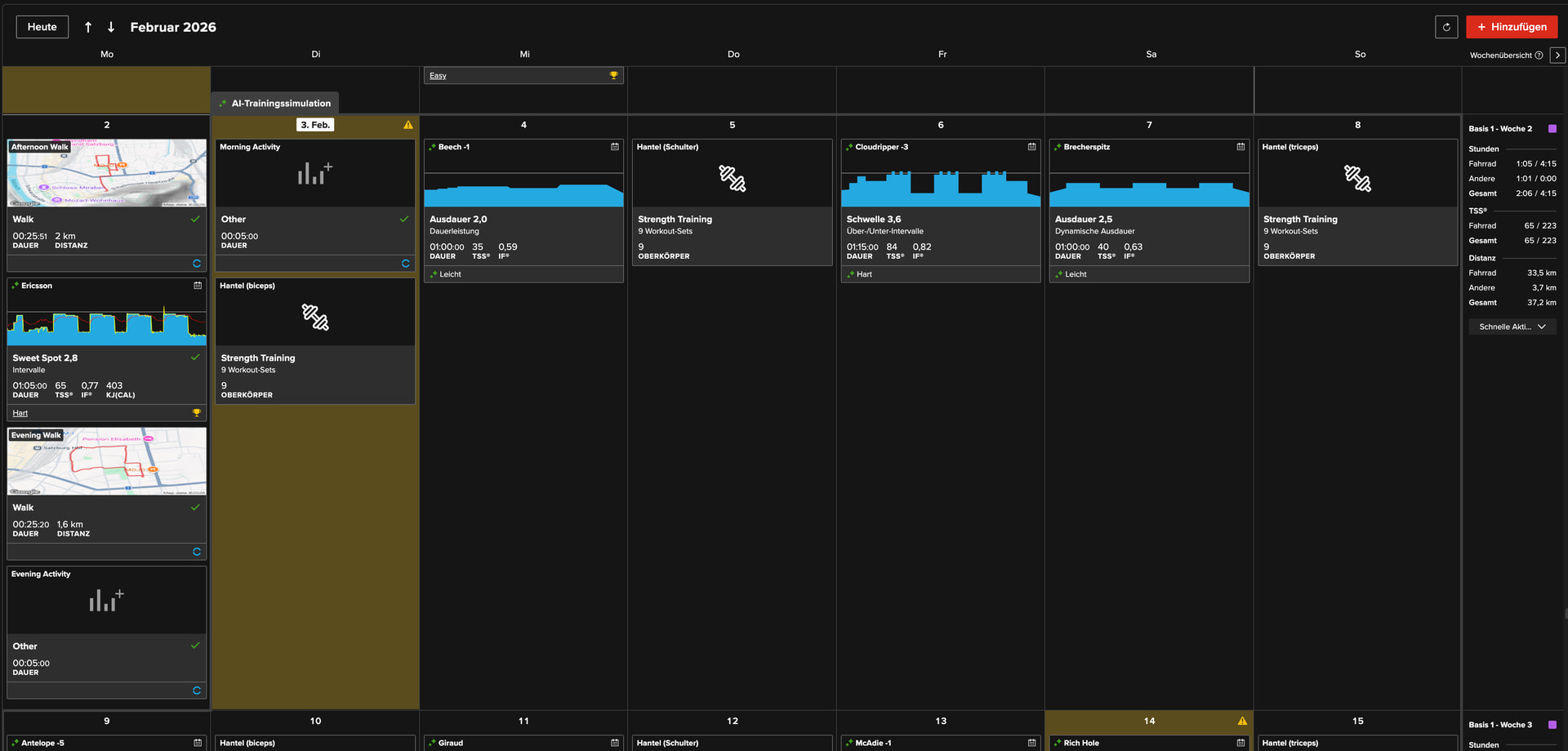
Here’s a screenshot showing how my plan currently looks:
After re-enabling Garmin Import, the plan shows a 5-minute 4-7-8 breathing session on Monday evening (HR below 60 bpm) and another 5-minute 4-7-8 breathing session on Tuesday morning (HR below 60 bpm). Despite this minimal load, Tuesday is flagged yellow.
If a hard TrainerRoad workout were scheduled instead of the planned strength session, it would be replaced by an endurance workout. This has been happening almost every day since I started the plan.
For clarity: the walking activities are just very easy dog walks:
If I leave Garmin Import enabled, the upcoming hard TrainerRoad workouts — which I really want to complete because they challenge me perfectly within my medical limitations — will unfortunately be replaced by easy endurance or near-recovery workouts.
I can post additional screenshots of my plan tomorrow or the day after if that helps.
And then there’s the issue with the workout text prompts during training. Those should be extremely easy to translate into other languages using AI — in my case, into German. Or am I missing something?
As it was never mentioned explicitly: Is the max HR entered in Account settings for HR based TSS estimation input into the model? (Asking because it was never officially advised to set this)
I do think that, one day, when we rise up against the machines or more likely, AI sentiment turns a little sour (arguably already happening), TR will get caught up in that sentiment, as most people don’t know a LLM from ML.. and at some point, having AI in the product name might not be a good thing, IMO!
So today TrainerRoad created the next yellow day based on the following activities:
– 3 easy dog walks (something I’ve done every day for the last 12 years)
– 2 breathing activities (5 minutes of 4-7-8 breathing each, HR under 60 bpm)
– 1 short strength workout (19 minutes, simple biceps exercises with 5 kg dumbbells)
None of these activities represent meaningful training stress, yet the day is still flagged yellow.
Sure, I can do that — but that can’t seriously be the intended solution. I shouldn’t have to disable everything for the system to work. TrainerRoad should be able to correctly recognize these very simple activities and not classify them as yellow, shouldn’t it?
I noticed this earlier but didn’t say anything because I didn’t want to step on TR’s toes, but one thing I notice is that your easy strength workout shows 9 working sets. If you look at the instructions, it suggests only logging the sets you take to (near) failure. That could be having a big impact?
Also, I’m not sure if I’d log breathing exercises.. It seems like sometimes, regardless of the intensity, when an athlete logs a certain amount of activities in one day (six in your case) the system seems to default to thinking you had a really busy, stressful day.
I can’t confirm this just yet, but it’s a hypothesis that I’ll look into.
I don’t understand your frustration. You have the option to get what you want, you just have one simple click.
You don’t have to disable everything, it’s more like a choice. You have a toggle and can choose to automatically adjust a workout (which is the default option as it is what the majority would set) and you can simply switch it to get your desired behavior. AI will still be active.
And if you really did 9 reps to failure strength training and added 50min dog walk then yellow seems not uncommon. I’d saz TR works correctly in your case.
If you are doing dog walks and breathing exercises daily or at least regularly, what is the value of logging them to TR? Personally, I wouldn’t want that cluttering up my calendar.