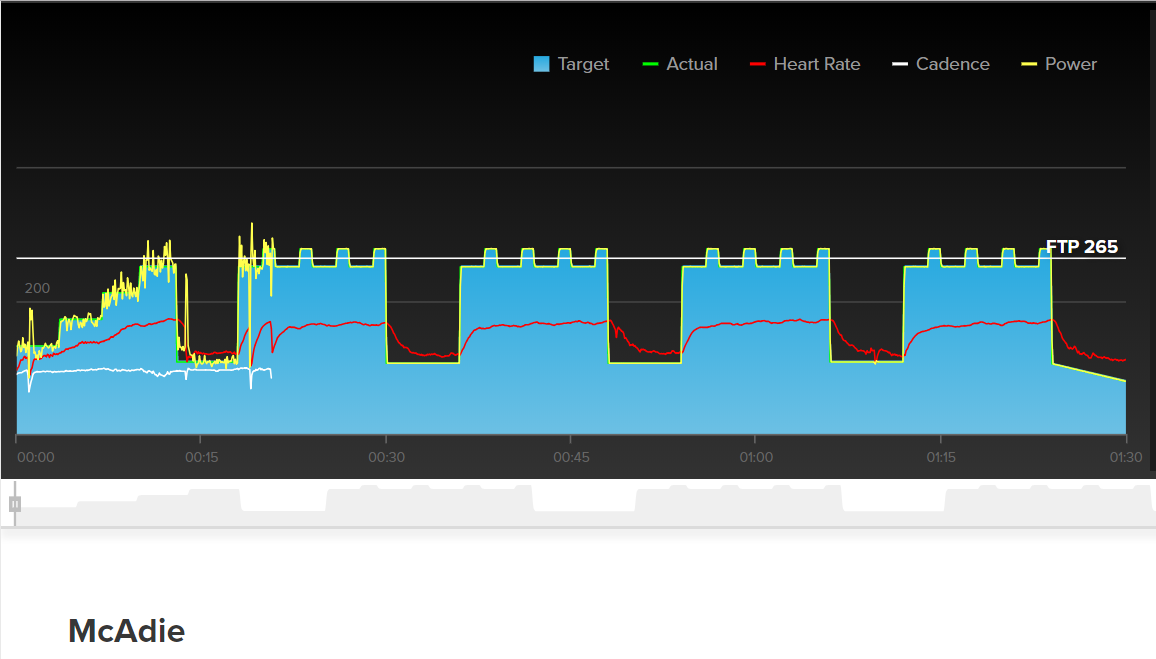
@Nate_Pearson, just as a comparison, I did Broken Finger -2 and Birch last week using a different PM (Rotor 2In rather than stages). Looking at the file, I’d say the problem could well be with the Stages?
I just started using powermatch on Tuesday. I am on my recovery week from SSD Mid II. Tuesday and Wednesday it worked great today on the other hand. I use ERG. My power was down 50 watts from my prescribed power no matter what I did? Anyone have that issue? I have a cyclops hammer and quarq. TIA!!!
Hey @Critwannabe, sorry you’re running into issues with your PowerMatch setup. Do you regularly calibrate the trainer and power meter? If you don’t mind, could you email our Support team at support@trainerroad.com? They should be able to get this sorted out for you.
I just started using powermatch and do calibrate my meter every time I use it but not my trainer since I started with match this week thinking I didn’t need to but found out I do need to.
I guess my auto offset was way high and the app couldn’t adjust my trainer high enough if that makes sense?
I was also advised to check my firmware in the trainer and the meter. This is where the issue will lie as my power meter is of unknown age. I got it used in 2016 so I would assume it is from 2014/15 possibly.
I don’t think I can update it or nervous to because of what I read because it seems if you try to update it, it could go dead and need sent back.
Hopefully if I do the spin down and calibration of the meter next workout it will work out if not I will go back to using trainer power and maybe get a new powermeter.
I’m glad they were able to clear that up for you! Yeah, although you’re using PowerMatch we still highly recommend calibrating your trainer as well. We want all devices to be as accurate/consistent as possible. I hope you’re able to update the firmware of your power meter, or that calibrating both devices fixes your problem!
I’ve down a few workouts with the new powermatch and it’s working great. Nice job TrainerRoad team!
I’m using a Kickr Core and Vector3 pedals. I was previously using the “Ant+ power source” option through the Wahoo IOS app with pretty good results, but there didn’t appear to be anyway to calibrate the power meter within the wahoo app so I didn’t really trust it. It’s so much nicer to be be able to do everything from within the TrainerRoad app now!
So far so good with the update. I’m currently on an Ant+ Quarq with first Gen Kicker. This set up has been working well and perhaps is reacting a little faster now with update, but honestly was happy before.
I’ll be moving back to a Bluetooth PM and my Tacx Neo shortly, so that has always been a good combo in the past, so hopefully it will still be at least as good, if not better.
Well, I am on the Kickr, and the Assiomas. Have been using powermatch, but recently did a BigRingVR, and saw that Assiomas matched the Kickr pretty well. Assiomas showing 2-4 watts higher, which is expected being pedal based.
So, since then stopped the powermatch and I get very good results.
I record the power on my Wahoo from my Assioma, and use TR to control the trainer. Power numbers are very close.
I’m using Vector 3 and Kickr16. Power match is greatly improved since the update, I’m in sweet spot base so there are no quick bursts, but so far no issues with jumping power.
Also I increased the power smoothing to 15 seconds, the placebo effect is great!
I’m using Assioma powermeter + Tacx Vortex. In general it works good as long as I’m in a high gear. I don’t know why but when I’m on the smaller ring on the front it’s very jumpy but could also be the Vortex cause I do feel quite some tire slippage especially when doing jumps in power and being on the small chain ring.
Only thing that I’m experiencing is on jumps in power, as seen below, the first ~20sec of a interval can be way too high, which hurts when there are 8 min threshold intervals but you start with 20 sec Vo2Max
Using Android. No beta version. Last update: 23th Jan 2019
That looks like a normal workout. If you want to tamp down the spikes at the start of an interval pick up your cadence ~5s before the interval change over so your legs don’t get loaded up as much on the jump. It also makes less things change at one time for the trainer and powermatch. After your comfortable at the new power you can let your cadence slide back down to where you want to be.
Tried the latest update on accident - used old iPad (TR updated) which still had old configuration on it and opted me into Powermatch. I set the iPad to the side so I don’t stare at it the entire time so initially just thought I was off to another rough day then figured it out. Can you tell where I turned it off! Ha.
When you turn powermatch off, the data looks very smooth. I only see it that smooth when using the kickr as the power source, the power reported by the kickr has a lot of smoothing applied, or it just displays what you want to see, one of the two!