Bumped into a problem with Copy Week: just copied a bunch of (completed) weeks from last year to this year, and it seems to move the copied workouts back by one day (so Monday’s w/o in the source gets copied to the Sunday before the Monday in the target week, etc.).
Right-click Copy Note doesn’t seem to work at all - nothing happens when selecting the option. Has this already been flagged?
Also feature request: it would be really useful (& time saving!) if there was an option within Copy/Move Week to also copy/move Notes that are present in the week being copied/moved. Copying/Moving these manually yourself (due to problem 2. currently having to do this copying by opening the Note and copying the text to the paste buffer, then using this text to create a new Note on the target date ) can take an age if, like me, you use descriptive annotations extensively for weeks and workouts.
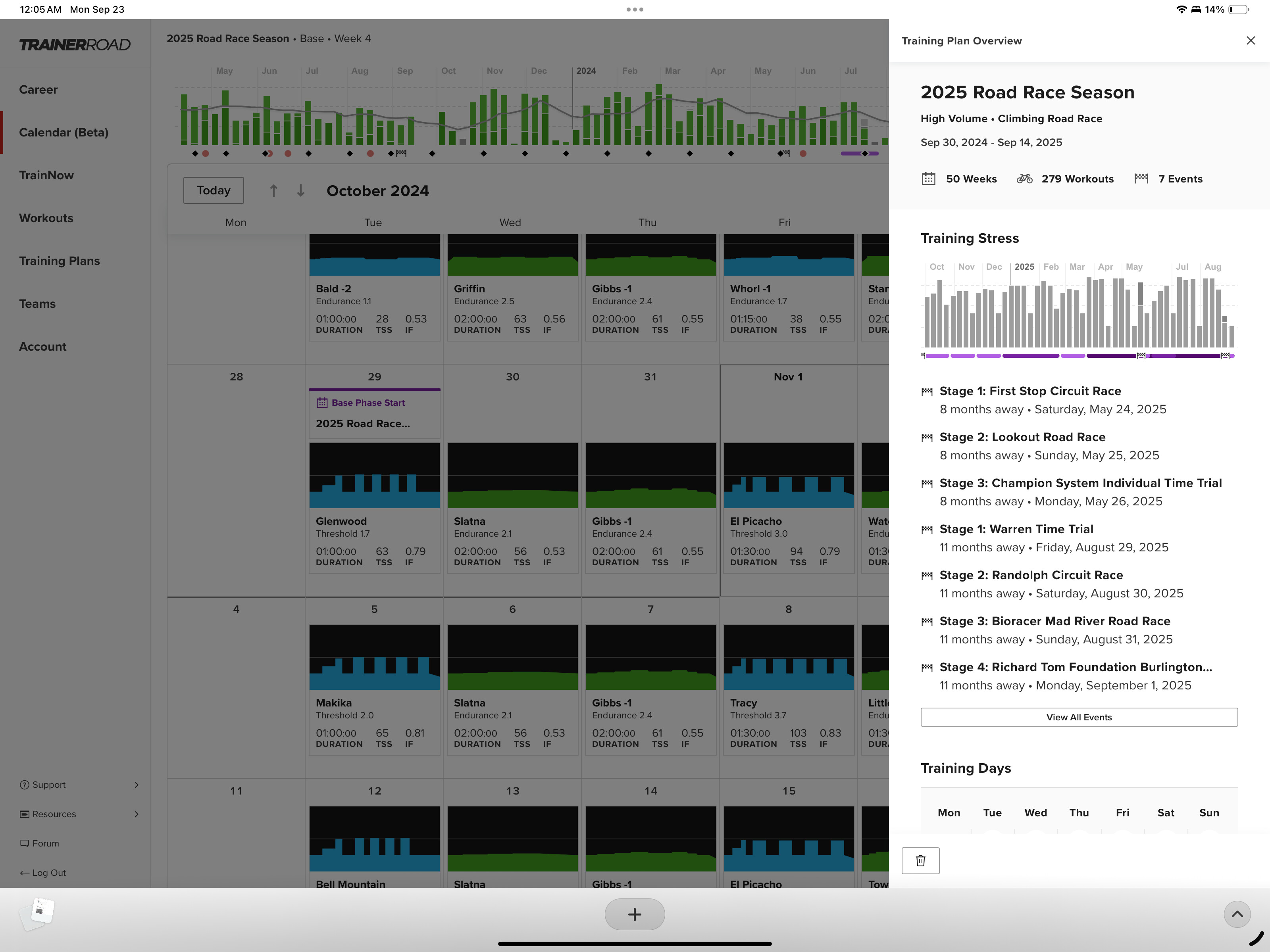
There is no option to delete the Base MId Volume plan i placed on my calendar at all. No option to delete is shown when I click on the plan name in my calendar and no option in the career page either.
Can you confirm you’re not seeing the delete button I’ve highlighted here? This should be present in the drawer when you click on your plan. If it’s not there, we’ll take a look and see what’s going on.
In the “old” calendar there is a way to edit a specific training block in a Plan Builder training plan to a different type (e.g General Base → Polarized):
All Training Plan edits (besides deleting your plan) are temporarily disabled in the new calendar as we wait for another new feature to be released. Stay tuned…
Still noticing that run TSS isn’t updating. It’s calculated in the workout, but not on the total section. I can work around this, but this appears to affect my 6 week rolling average and thus will it have an impact on RLGL?
An engineer has started working on this bug today, but it is a display issue only and is exclusive to the new calendar. RLGL is not impacted and will be the same on both calendars.
I am unable to drag and move around Strength Sessions - needing to go into it and change the date. While not 100% certain I thought we could do this on the old calendar…sorry if someone else already mentioned this.
As I was writing this, I originally had another bullet point asking you to keep updating your known issues list. But I checked your 1st post in this thread after I posted my request, and saw that you are updating the known issues, so I deleted the bullet with the ask for you to do it. Unfortunately, formatting doesn’t support cross-out text, so I just added a comment saying I deleted the “please keep the known issues list up to date”. Does this make sense?
Got it! It sure does. I haven’t updated it since last week but will do so later today. And to prevent you from needing to scroll back up, maybe I should post an update every few days in the thread with current known issues and recent improvements? That might keep things a little more legible.
I’m keeping the list of known issues and bugs updated in the original post, but it’s tedious to scroll up, so here’s an update as of Monday evening 9/23:
Current Known Issues (Updated 9/23)
Note: this list is not exhaustive and doesn’t include all small items and edge cases.
The calendar beta does not support small mobile device screens, but it may work for some tablets in landscape orientation. It does not yet officially support non-English language settings.
General Performance
Chrome-based browsers (including Chrome, Edge, and Brave) can experience degraded scrolling performance when the TSS graph is open.
TSS Chart:
Several small improvements and bug fixes are needed for hovering and clicking chart elements
Future TSS trendline is missing
Hover state displays under some calendar annotations
Calendar days
Second activities on the same day sometimes show less information
TSS is not displayed for some non-cycling activities
Rest Days are not clickable
Runs and hikes are displayed as “Other”
Workout difficulty may show “unknown” after toggling inside/outside
Adaptations
Adaptations may persist after deleting a training plan
Suggested adaptations can cause a display bug for calendar in background
Right-Click menu
“Copy” doesn’t work for calendar annotations (notes, time off, etc)
Changing color of annotations is very slow
Training Plans don’t have a right click state
Week Totals column
TSS from some activities is not being included
Swim distance is not being included
Drawer
Training Plan “Edit Plan” button is temporarily disabled
Training Plan volume sometimes displays incorrectly
Some workout filters are missing or are not applied correctly
Editing recurring activities is buggy and needs improvement.
RPE response can’t be changed from the drawer and may display incorrectly
Rides without power lack expected notification banners
Drawer may display wrong title for associated outside ride
“Associated workout” item needs bug improvements
Completed activities associated with events show incomplete drawer.
Alternates for outside workouts may show wrong data when selected
Runs are not showing a pace line on their details graph
Recent Improvements and Fixes:
Fixed a bug that occurred when associating/disassociating workouts via right-click
Fixed a bug where plan builder would not use the date selected on the calendar to build a new plan
Fixed an bug with display of completed and planned TSS, Duration, and Distance
Fixed a bug preventing planned workouts from being swapped between inside / outside from the drawer
Fixed a bug that could result in a white screen or prevent the weekly totals column from loading
Fixed a bug where the FTP line in the workout graph was mistakenly using the workout’s TSS
Coming soon:
We have a ton of significant improvements in progress that should be rolling out in the coming days. These include performance improvements, fixes for bugs affecting Alternates, Walks, and Stage Races, and functionality upgrades for the drawer. I’ll keep you all posted as they roll out!
Little UI consistency suggestion:
Wouldn’t it make sense to have the “import activity” function as an option in the “add to calendar” slider instead of having it somewhere completely separate in career => past activities.
We do have plans to add import functionality right to the calendar, likely via a simple drag and drop action. It’s used by so few athletes we’ve tended away from giving it its own button.
 ) can take an age if, like me, you use descriptive annotations extensively for weeks and workouts.